ATOC 4815/5815

Multi-Dimensional Data with xarray - Week 8

Will Chapman

CU Boulder ATOC

Spring 2026

Multi-Dimensional Data & xarray

Reminders

Due this evening at 12pm:

  • Lab 6

Office Hours:

Will: Tu 11:15-12:15p; Th 9-9:50a

Aerospace Cafe

Aiden: M / W 330-430p

DUAN D319

DUAN Building

ATOC 4815/5815 Playlist

Spotify Playlist: ATOC4815

  • This Lecture:

Ezra Furman, and The Harpoons -> Take Off Your Sunglasses

Today’s Objectives

  • Understanding xarray: from tables to N-dimensional grids
  • Working with dimensions, coordinates, and attributes
  • Reading and exploring NetCDF files
  • Selecting data by label and position
  • Computing climatologies and seasonal averages
  • Automatic alignment and broadcasting
  • Creating publication-quality maps and time series

Your Research Scenario

Imagine: You’re analyzing the 2023 North American heat wave using ERA5 reanalysis data

Your data:

  • 4D gridded dataset: temperature(time, level, lat, lon)
  • Spatial coverage: North America (15°N-70°N, 130°W-60°W)
  • Temporal: January 1979 - December 2023 (45 years, daily data = 16,425 days)
  • Vertical: 37 pressure levels (1000 hPa to 1 hPa)
  • Grid resolution: 0.25° × 0.25° (~25 km)
  • File size: ~50 GB for temperature alone

Questions you need to answer:

  1. What was the maximum temperature in Boulder during summer 2023?
  2. How does 2023 compare to the 1991-2020 climatology?
  3. What’s the vertical temperature profile during the heat wave?
  4. Where was the heat wave most intense (spatial pattern)?
  5. Has the frequency of heat waves increased over 45 years?

Why Not Pandas or NumPy?

You know both — here’s where they break down for gridded climate data:

Pandas: only 2D

# Data is 4D: time × level × lat × lon
# Shape: (16425, 37, 221, 281)
# Can't be represented as a table!

# And even for 2D:
mean_temp = df.mean(axis=2)
# XX! Was axis=2 lat or lon?

NumPy: no labels

# NumPy handles N-D, but...
temp.mean(axis=1)
# XX! Is axis=1 pressure or latitude?
# Check your notes every single time!

Both: no coordinate-based selection

# Want Boulder (40°N, 105°W) at 500 hPa?
lat_idx = np.argmin(np.abs(lats - 40.0))
lon_idx = np.argmin(np.abs(lons - -105.0))
lev_idx = np.argmin(np.abs(levs - 500.0))
temp[:, lev_idx, lat_idx, lon_idx]
# XX! Easy to mix up order, loses metadata

xarray solves all of this:

temp.sel(lat=40, lon=-105,
         level=500, method='nearest')
# ++! Self-documenting, coordinate-aware

What xarray Gives Us

xarray = “Pandas for multi-dimensional arrays”

1. Named dimensions:

# Dimensions have names, not just axis numbers
temp.mean(dim='level')  # ++! Crystal clear: averaging over pressure levels
temp.mean(dim='time')   # ++! Time average

2. Coordinate-based selection:

# Select by actual coordinate values, not indices
temp.sel(lat=40, lon=-105, level=500, method='nearest')  # ++! That easy!

3. Automatic alignment:

# Subtract climatology from daily data—xarray aligns by coordinates automatically
anomaly = temp_daily - temp_climatology  # ++! Just works!

4. Metadata preservation:

# Units, long_names, coordinates all travel with the data
print(temp.attrs['units'])  # 'Kelvin'
print(temp.coords['time'])  # Full date range

Bottom line: For gridded climate/atmospheric data, xarray is essential. It combines NumPy’s N-D power with Pandas’ labeled axis convenience.

Mental Model: NumPy → Pandas → xarray

Think of the progression:

NumPy:        "Calculator for N-D arrays of numbers"
              ++! Fast math, any number of dimensions
              XX! No dimension names, no coordinates, no metadata

Pandas:       "Spreadsheet with labeled rows & columns"
              ++! Named columns, time indexing, metadata
              XX! Only 2D (rows × columns)

xarray:       "Pandas for N-dimensional grids"
              ++! Named dimensions (time, lat, lon, level)
              ++! Coordinate-based selection
              ++! Metadata preservation (units, attrs)
              ++! Built on NumPy + Pandas

xarray Fundamentals

DataArray: Core Building Block

A DataArray is an N-D array with:

  • Data: The actual values (NumPy array)
  • Dimensions: Names for each axis (‘time’, ‘lat’, ‘lon’, …)
  • Coordinates: Values along each dimension
  • Attributes: Metadata (units, long_name, …)
import numpy as np
import xarray as xr
import pandas as pd

# Create a simple DataArray
time = pd.date_range('2024-01-01', periods=5, freq='D')
lat = [40, 41, 42]
lon = [-105, -104, -103]

# 3D temperature data: (time, lat, lon)
data = 15 + 10 * np.random.rand(5, 3, 3)

temp = xr.DataArray(
    data,
    dims=['time', 'lat', 'lon'],
    coords={'time': time, 'lat': lat, 'lon': lon},
    attrs={'units': 'Celsius', 'long_name': 'Air Temperature'}
)

print(temp)
<xarray.DataArray (time: 5, lat: 3, lon: 3)> Size: 360B
array([[[16.93856344, 20.07690915, 20.58908685],
        [22.33581146, 16.47784363, 19.73835816],
        [24.97825417, 22.64827789, 16.32153582]],

       [[17.92111669, 23.58072081, 22.95328013],
        [15.37202453, 23.34507234, 17.48960759],
        [23.46116635, 17.32794891, 19.90562568]],

       [[19.17798899, 19.24379679, 19.37382749],
        [24.62932737, 17.86306022, 21.06335315],
        [20.35382199, 24.22087143, 18.97423873]],

       [[20.54794827, 22.36417509, 21.248144  ],
        [18.17693122, 16.88266316, 20.48561651],
        [19.44097241, 20.24019849, 20.7455535 ]],

       [[18.61123473, 24.7631678 , 19.81621233],
        [17.16570077, 15.90586911, 24.85262517],
        [24.44914102, 19.11471976, 15.62464597]]])
Coordinates:
  * time     (time) datetime64[ns] 40B 2024-01-01 2024-01-02 ... 2024-01-05
  * lat      (lat) int64 24B 40 41 42
  * lon      (lon) int64 24B -105 -104 -103
Attributes:
    units:      Celsius
    long_name:  Air Temperature
print("Dimensions:", temp.dims)
print("Shape:", temp.shape)
print("Attributes:", temp.attrs)
print("First time step:\n", temp.isel(time=0))
Dimensions: ('time', 'lat', 'lon')
Shape: (5, 3, 3)
Attributes: {'units': 'Celsius', 'long_name': 'Air Temperature'}
First time step:
 <xarray.DataArray (lat: 3, lon: 3)> Size: 72B
array([[16.93856344, 20.07690915, 20.58908685],
       [22.33581146, 16.47784363, 19.73835816],
       [24.97825417, 22.64827789, 16.32153582]])
Coordinates:
    time     datetime64[ns] 8B 2024-01-01
  * lat      (lat) int64 24B 40 41 42
  * lon      (lon) int64 24B -105 -104 -103
Attributes:
    units:      Celsius
    long_name:  Air Temperature

Key insight: Dimensions + Coordinates = Self-describing data. You always know what each axis represents and what values it contains!

Dataset: Collection of DataArrays

A Dataset is like a dictionary of DataArrays sharing dimensions:

# Create multiple variables
temp_data = 15 + 10 * np.random.rand(5, 3, 3)
precip_data = np.random.exponential(2, (5, 3, 3))

# Combine into Dataset
ds = xr.Dataset({
    'temperature': (['time', 'lat', 'lon'], temp_data,
                   {'units': 'Celsius', 'long_name': 'Air Temperature'}),
    'precipitation': (['time', 'lat', 'lon'], precip_data,
                     {'units': 'mm', 'long_name': 'Total Precipitation'})
},
coords={'time': time, 'lat': lat, 'lon': lon}
)

print(ds)
<xarray.Dataset> Size: 808B
Dimensions:        (time: 5, lat: 3, lon: 3)
Coordinates:
  * time           (time) datetime64[ns] 40B 2024-01-01 ... 2024-01-05
  * lat            (lat) int64 24B 40 41 42
  * lon            (lon) int64 24B -105 -104 -103
Data variables:
    temperature    (time, lat, lon) float64 360B 20.46 17.11 ... 16.38 19.13
    precipitation  (time, lat, lon) float64 360B 1.017 0.7662 ... 4.313 1.712
# Access variables — dict-style or dot notation
print(ds['temperature'])
print(ds.temperature.mean())
<xarray.DataArray 'temperature' (time: 5, lat: 3, lon: 3)> Size: 360B
array([[[20.46328924, 17.10996821, 23.06998374],
        [18.55262473, 23.1864479 , 24.58228831],
        [21.18996977, 16.61555146, 19.85501004]],

       [[15.24837317, 18.50122666, 17.68265154],
        [21.11826595, 16.09307475, 17.43689267],
        [20.8751895 , 21.23087879, 21.06066611]],

       [[24.65924791, 16.38884279, 19.76403663],
        [21.70005084, 18.30832485, 17.07244428],
        [16.34486208, 18.15972994, 24.63939805]],

       [[20.29717612, 17.81275036, 23.25827434],
        [20.76069416, 24.55673107, 17.27522545],
        [19.05321689, 22.372248  , 21.55491885]],

       [[21.95075018, 17.26374319, 21.09220719],
        [21.47486966, 22.08623032, 23.59003384],
        [23.03287405, 16.37750142, 19.12551652]]])
Coordinates:
  * time     (time) datetime64[ns] 40B 2024-01-01 2024-01-02 ... 2024-01-05
  * lat      (lat) int64 24B 40 41 42
  * lon      (lon) int64 24B -105 -104 -103
Attributes:
    units:      Celsius
    long_name:  Air Temperature
<xarray.DataArray 'temperature' ()> Size: 8B
array(20.08542781)
  • DataArray = one variable (like a Pandas Series, but N-dimensional)
  • Dataset = multiple variables sharing dimensions (like a Pandas DataFrame, but N-dimensional)

Common Error: Dimension Name Mismatch

Predict the output:

temp = xr.DataArray(
    np.random.rand(5, 3),
    dims=['time', 'lat'],
    coords={'time': range(5), 'lat': [40, 41, 42]}
)

# Try to select by 'latitude' instead of 'lat'
subset = temp.sel(latitude=40)
ValueError: 'latitude' is not a valid dimension or coordinate

Explanation: Dimension name was ‘lat’, not ‘latitude’—exact match required!

The Fix:

# Always check dimension names first
print(temp.dims)  # ('time', 'lat')

# Use the correct name
subset = temp.sel(lat=40, method='nearest')  # ++! Works!

Common causes:

  • Typos: ‘latitude’ vs ‘lat’, ‘longitude’ vs ‘lon’
  • Different conventions: ‘lev’ vs ‘level’ vs ‘plev’
  • Always use print(data.dims) to check!

Try It Yourself 💻

With your neighbor (5 min): Create your first DataArray

# Create a DataArray for wind speed
# Dimensions: time (3 days), lat (2 points), lon (2 points)
# Use realistic Boulder coordinates: lat=[40, 40.5], lon=[-105, -104.5]

import xarray as xr
import numpy as np
import pandas as pd

# Your code here:
# 1. Create time coordinate (3 days starting 2024-01-01)
# 2. Create spatial coordinates
# 3. Create random wind data (3 x 2 x 2)
# 4. Build DataArray with appropriate dims, coords, and attrs
# 5. Print it and verify the structure
# 6. Try selecting the first time step

Answer:

time = pd.date_range('2024-01-01', periods=3, freq='D')
lat = [40.0, 40.5]
lon = [-105.0, -104.5]

wind_data = 5 + 10 * np.random.rand(3, 2, 2)

wind = xr.DataArray(
    wind_data,
    dims=['time', 'lat', 'lon'],
    coords={'time': time, 'lat': lat, 'lon': lon},
    attrs={'units': 'm/s', 'long_name': 'Wind Speed'}
)

print(wind)
print("\nFirst time step:")
print(wind.isel(time=0))

Reading NetCDF Files

What is NetCDF?

NetCDF (Network Common Data Form): Standard format for scientific array data

Used by:

  • Climate models (CMIP, CESM, WRF)
  • Reanalysis (ERA5, MERRA-2, NCEP)
  • Satellite data (MODIS, GOES, GPM)
  • Observational datasets (ARGO, radiosondes)

Why NetCDF?

  • Self-describing (includes metadata)
  • Efficient compression
  • Platform-independent
  • Handles large datasets
  • Supports unlimited dimensions (e.g., growing time series)

xarray’s superpower: Native NetCDF support

ds = xr.open_dataset('ERA5_temperature.nc')  # That's it!

Opening NetCDF Files

# Open real CAMulator output — 10 days of global atmosphere at 1° resolution
ds = xr.open_dataset('camulator_sample.nc')
print(ds)
<xarray.Dataset> Size: 3MB
Dimensions:    (time: 10, latitude: 96, longitude: 144)
Coordinates:
    level      int64 8B ...
  * latitude   (latitude) float32 384B -90.0 -88.12 -86.23 ... 85.29 87.17 89.06
  * longitude  (longitude) float32 576B 0.0 2.5 5.0 7.5 ... 352.5 355.0 357.5
  * time       (time) object 80B 0001-01-01 12:00:00 ... 0001-01-10 12:00:00
Data variables:
    U          (time, latitude, longitude) float32 553kB ...
    V          (time, latitude, longitude) float32 553kB ...
    PS         (time, latitude, longitude) float32 553kB ...
    Qtot       (time, latitude, longitude) float32 553kB ...
    TREFHT     (time, latitude, longitude) float32 553kB ...
    PRECT      (time, latitude, longitude) float32 553kB ...

Exploring Dataset Contents

Rule #1: always inspect before you analyze. Before writing a single line of analysis code, run these:

# View all variables
print("Variables:", list(ds.data_vars))

# View dimensions
print("\nDimensions:", dict(ds.dims))

# View coordinates
print("\nCoordinates:", list(ds.coords))

# Global attributes
print("\nGlobal attributes:", ds.attrs)

# Specific variable attributes
print("\nTREFHT attributes:", ds['TREFHT'].attrs)
Variables: ['U', 'V', 'PS', 'Qtot', 'TREFHT', 'PRECT']

Dimensions: {'time': 10, 'latitude': 96, 'longitude': 144}

Coordinates: ['level', 'latitude', 'longitude', 'time']

Global attributes: {}

TREFHT attributes: {}

These four lines answer every question that causes errors: What are my variables called? What are my dimension names? What are my coordinate ranges? What units am I in?

Common Error: Forgetting to Close Files

Predict the problem:

# Open large dataset
ds = xr.open_dataset('ERA5_50GB.nc')

# Do some analysis
mean_temp = ds['t2m'].mean()

# Try to delete or overwrite the file
os.remove('ERA5_50GB.nc')  # XX! File is still open!
PermissionError: The file is being used by another process

The Fix: Use context manager

# ++! Automatically closes file when done
with xr.open_dataset('ERA5_50GB.nc') as ds:
    mean_temp = ds['t2m'].mean()
    # File closes automatically here

# Or manually close
ds = xr.open_dataset('ERA5_50GB.nc')
mean_temp = ds['t2m'].mean()
ds.close()  # ++! Explicit close

Best practice: Always use with xr.open_dataset(...) as ds: for safety

Selection & Indexing

Three Ways to Select Data

xarray provides three selection methods:

Method Selection By Example
.isel() Integer position (like NumPy) ds.isel(time=0) → first time
.sel() Label/coordinate value ds.sel(lat=40) → data at 40°N
.loc[] Label (pandas-style) ds.loc['2024-01-01']

When to use each:

  • isel: When you want “first 10 time steps” or “every 3rd latitude”
  • sel: When you want “data at 500 hPa” or “January 2024”
  • loc: Rarely used in xarray; .sel() is preferred

Selection by Position: .isel()

# Select first time step
first_time = ds['TREFHT'].isel(time=0)
print("First time step:")
print(first_time)

print("\n" + "="*60 + "\n")

# Select first 3 times, every 2nd latitude
subset = ds['TREFHT'].isel(time=slice(0, 3), latitude=slice(0, None, 2))
print("Subset shape:", subset.shape)
print(subset)
First time step:
<xarray.DataArray 'TREFHT' (latitude: 96, longitude: 144)> Size: 55kB
[13824 values with dtype=float32]
Coordinates:
    level      int64 8B ...
  * latitude   (latitude) float32 384B -90.0 -88.12 -86.23 ... 85.29 87.17 89.06
  * longitude  (longitude) float32 576B 0.0 2.5 5.0 7.5 ... 352.5 355.0 357.5
    time       object 8B 0001-01-01 12:00:00

============================================================

Subset shape: (3, 48, 144)
<xarray.DataArray 'TREFHT' (time: 3, latitude: 48, longitude: 144)> Size: 83kB
[20736 values with dtype=float32]
Coordinates:
    level      int64 8B ...
  * latitude   (latitude) float32 192B -90.0 -86.23 -82.46 ... 79.63 83.4 87.17
  * longitude  (longitude) float32 576B 0.0 2.5 5.0 7.5 ... 352.5 355.0 357.5
  * time       (time) object 24B 0001-01-01 12:00:00 ... 0001-01-03 12:00:00

Use .isel() when:

  • “Give me the first/last N time steps”
  • “Every 3rd grid point”
  • “Skip the first 10 latitudes”

Selection by Label: .sel()

# Select specific time step by label
day5 = ds['TREFHT'].sel(time='0001-01-05')
print("Model day 5:")
print(day5)

print("\n" + "="*60 + "\n")

# Select Western US region
# Note: CAMulator uses 0-360° longitude  (-105°W = 255°E)
western_us = ds['TREFHT'].sel(
    latitude=slice(30, 50),
    longitude=slice(240, 270)
)
print("Western US region shape:", western_us.shape)
print(western_us)
Model day 5:
<xarray.DataArray 'TREFHT' (time: 1, latitude: 96, longitude: 144)> Size: 55kB
[13824 values with dtype=float32]
Coordinates:
    level      int64 8B ...
  * latitude   (latitude) float32 384B -90.0 -88.12 -86.23 ... 85.29 87.17 89.06
  * longitude  (longitude) float32 576B 0.0 2.5 5.0 7.5 ... 352.5 355.0 357.5
  * time       (time) object 8B 0001-01-05 12:00:00

============================================================

Western US region shape: (10, 11, 13)
<xarray.DataArray 'TREFHT' (time: 10, latitude: 11, longitude: 13)> Size: 6kB
[1430 values with dtype=float32]
Coordinates:
    level      int64 8B ...
  * latitude   (latitude) float32 44B 30.63 32.51 34.4 ... 45.71 47.59 49.48
  * longitude  (longitude) float32 52B 240.0 242.5 245.0 ... 265.0 267.5 270.0
  * time       (time) object 80B 0001-01-01 12:00:00 ... 0001-01-10 12:00:00

Nearest Neighbor Selection

Problem: Your coordinates may not exactly match grid points

# Boulder: 40.015°N, 105.27°W
# CAMulator uses 0-360° longitude → -105.27°W = 254.73°E

# XX! This might fail if exact value isn't in the grid
# ds['TREFHT'].sel(latitude=40.015, longitude=254.73)

# ++! Find nearest grid point
boulder_temp = ds['TREFHT'].sel(
    latitude=40.015,
    longitude=254.73,
    method='nearest'
)
print("TREFHT at Boulder (nearest grid point):")
print(boulder_temp)
TREFHT at Boulder (nearest grid point):
<xarray.DataArray 'TREFHT' (time: 10)> Size: 40B
[10 values with dtype=float32]
Coordinates:
    level      int64 8B ...
    latitude   float32 4B 40.05
    longitude  float32 4B 255.0
  * time       (time) object 80B 0001-01-01 12:00:00 ... 0001-01-10 12:00:00

method options:

  • 'nearest' - Closest value (most common)
  • 'pad' / 'ffill' - Forward fill
  • 'backfill' / 'bfill' - Backward fill

Longitude convention pitfall — 0–360 vs -180–180:

Different datasets use different conventions. CAMulator and many climate models use 0–360. ERA5 uses -180–180.

# Convert -180/180 → 0/360 with modulo
lon_360 = lon % 360          # -105.27 % 360 = 254.73 ++!

# Convert 0/360 → -180/180
lon_180 = (lon + 180) % 360 - 180   # 254.73 → -105.27 ++!

# Always check before .sel()!
print(ds.longitude.min().values, ds.longitude.max().values)

Common Error: isel vs sel Confusion

Predict the output:

ds = xr.Dataset(...)  # Has dims: time, lat, lon

# Try to select time=0 with .sel()
subset = ds.sel(time=0)
KeyError: 0
# or
ValueError: 0 is not in the time coordinates

Explanation: .sel() expects a coordinate value (e.g., a date), not an index!

The Fix:

# XX! Wrong: 0 is an index, not a date
ds.sel(time=0)

# ++! Right: Use .isel() for integer positions
ds.isel(time=0)

# ++! Right: Use .sel() with actual coordinate value
ds.sel(time='0001-01-01')

Rule of thumb:

  • Index number (0, 1, 2, …) → .isel()
  • Coordinate value (date, lat, lon, pressure) → .sel()

Try It Yourself 💻

With your neighbor (5 min): Practice selection methods

# Using our CAMulator sample dataset
ds = xr.open_dataset('camulator_sample.nc')

# Tasks:
# 1. Select the last time step using .isel()
# 2. Select all data from model day 3 using .sel()
# 3. Select TREFHT at latitude=40°N, longitude=255°E (nearest)
# 4. Select a time slice: model days 2-5
# 5. What happens if you try ds.sel(time=5)?  Why?

Answers:

# 1. Last time step
last = ds['TREFHT'].isel(time=-1)

# 2. Model day 3
day3 = ds['TREFHT'].sel(time='0001-01-03')

# 3. Specific point (nearest neighbor)
# CAMulator uses 0-360° longitude: -105°W = 255°E
point = ds['TREFHT'].sel(latitude=40, longitude=255, method='nearest')

# 4. Time slice
days2_to_5 = ds['TREFHT'].sel(time=slice('0001-01-02', '0001-01-05'))

# 5. This fails! Because 5 is an index, not a coordinate value
# ds.sel(time=5)  # KeyError: 5 not in time coordinates
# Should use: ds.isel(time=5) or ds.sel(time='0001-01-06')

Operations & Computations

Reductions Along Dimensions

Specify which dimension(s) to reduce over:

# Time mean (for each grid point)
time_mean = ds['TREFHT'].mean(dim='time')
print("Time-averaged TREFHT (one value per grid point):")
print(f"Shape: {time_mean.shape}")
print(time_mean)

print("\n" + "="*60 + "\n")

# Spatial mean (for each time)
spatial_mean = ds['TREFHT'].mean(dim=['latitude', 'longitude'])
print("Spatially-averaged TREFHT (time series):")
print(f"Shape: {spatial_mean.shape}")
print(spatial_mean.values)
Time-averaged TREFHT (one value per grid point):
Shape: (96, 144)
<xarray.DataArray 'TREFHT' (latitude: 96, longitude: 144)> Size: 55kB
array([[244.27246, 244.44702, 243.88583, ..., 244.99138, 244.55624,
        244.99077],
       [247.03577, 247.36443, 247.00125, ..., 247.90244, 247.47116,
        247.16496],
       [247.36038, 247.13904, 246.65787, ..., 248.20163, 247.74532,
        247.38974],
       ...,
       [248.94681, 248.57193, 248.46635, ..., 248.75125, 248.85898,
        248.78418],
       [246.23418, 245.61032, 245.33566, ..., 246.41048, 246.27267,
        246.22623],
       [244.24028, 243.97885, 243.56596, ..., 244.83086, 244.46884,
        244.15923]], shape=(96, 144), dtype=float32)
Coordinates:
    level      int64 8B ...
  * latitude   (latitude) float32 384B -90.0 -88.12 -86.23 ... 85.29 87.17 89.06
  * longitude  (longitude) float32 576B 0.0 2.5 5.0 7.5 ... 352.5 355.0 357.5

============================================================

Spatially-averaged TREFHT (time series):
Shape: (10,)
[276.81354 276.8283  276.76266 276.67728 276.73184 276.75296 276.72833
 276.72208 276.6905  276.59946]

Key difference from NumPy:

  • NumPy: arr.mean(axis=1) → Have to remember which axis is which
  • xarray: da.mean(dim='latitude') → Crystal clear!

Common Error: Wrong Dimension Name

Predict the output:

# Calculate time mean
temp = ds['TREFHT'].mean(dim='times')  # Typo: should be 'time'
ValueError: 'times' not found in array dimensions ('time', 'latitude', 'longitude')

The Fix:

# ++! Check dimensions first
print(ds['TREFHT'].dims)  # ('time', 'latitude', 'longitude')

# ++! Use exact dimension name
temp_mean = ds['TREFHT'].mean(dim='time')

Pro tip: Use tab completion! Type ds['TREFHT'].mean(dim=' then TAB to see options

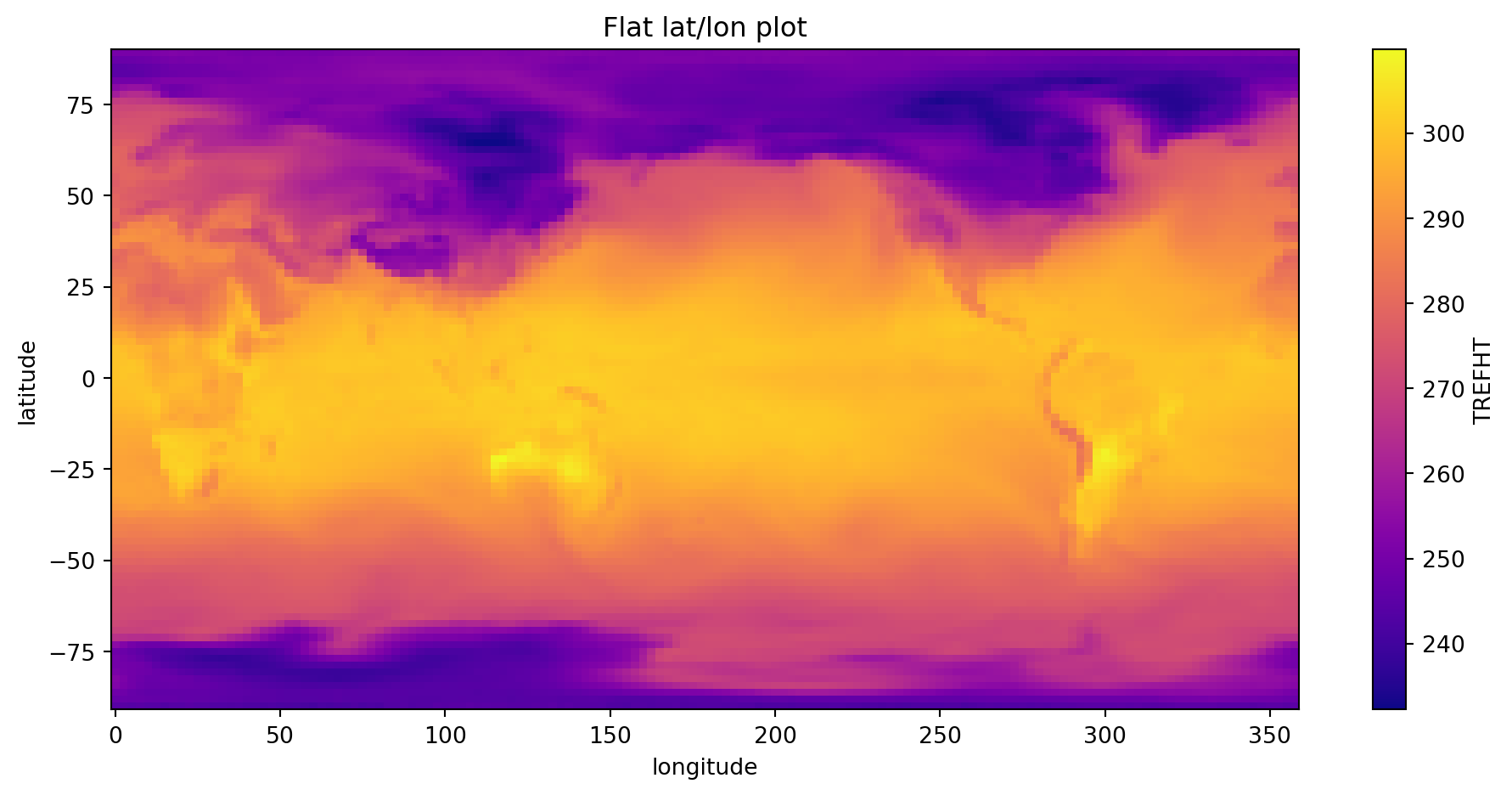
T2m Spatial Plot

import matplotlib.pyplot as plt
ds['TREFHT'].isel(time=0).plot(cmap='plasma')
plt.title('Flat lat/lon plot')
plt.tight_layout()
plt.show()

If I wanted to take a global mean…

Would a simple .mean() over all grid points be fair?

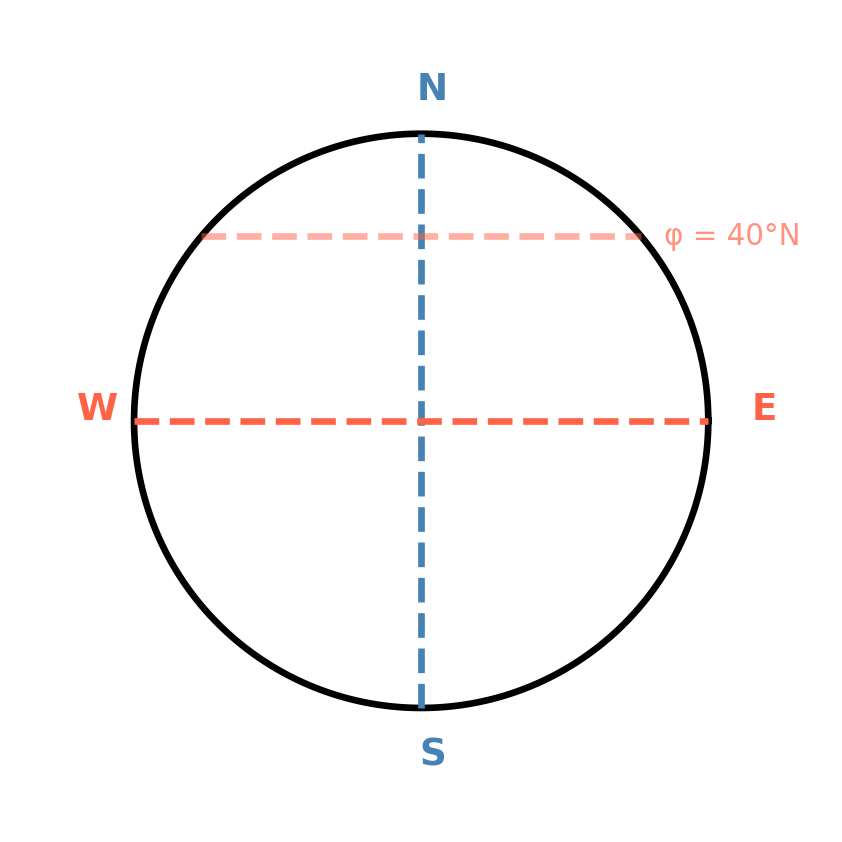
Arc length: \(\quad s = r \, \theta\)

where \(r\) is the radius of the circle and \(\theta\) is the angle in radians.

What is \(r\) for the blue line? What is \(r\) for the red line at latitude \(\phi\)?

Why cos(lat)? The Intuition

Each latitude band spans the same angle Δφ — but very different areas.

The circumference of a latitude circle shrinks as you move toward the poles: \(C(\phi) = 2\pi R\cos\phi\). So polar grid cells are tiny slivers, equatorial cells are full-width bands.

Why cos(lat)? Deriving the Area Element

Where does \(\cos\phi\) come from? A grid cell has two sides — here’s the geometry:

  • North–south edge (along a meridian): arc length \(= R\,d\phi\)
  • East–west edge (along a latitude circle): the radius of that circle is \(R\cos\phi\), so arc length \(= R\cos\phi\;d\lambda\)
  • Area \(=\) (N–S edge) \(\times\) (E–W edge) \(= R^2\cos\phi\;d\phi\;d\lambda\)

For equal-angle grids where every cell has the same \(d\phi\) and \(d\lambda\), the only thing that varies is \(\cos\phi_i\) — so that’s your weight.

Area-Weighted Mean:

The naive global mean is scientifically wrong — polar grid cells are tiny, but .mean() treats them equal to tropical cells.

Without xarray, this is the “simple” fix:

# Step 1: compute 1D weights
weights_1d = np.cos(np.deg2rad(lats))          # shape: (96,)
# Step 2: broadcast to match your (time, lat, lon) array — easy to get wrong
weights_3d = weights_1d[np.newaxis, :, np.newaxis]  # shape: (1, 96, 1)
# Step 3: weighted sum, remembering which axes are lat vs lon
weighted_sum  = np.sum(data * weights_3d, axis=(1, 2))
weight_total  = np.sum(weights_3d * np.ones_like(data), axis=(1, 2))
weighted_mean = weighted_sum / weight_total    # ...and pray axis order was right

With xarray:

import matplotlib.pyplot as plt

naive_mean    = ds['TREFHT'].mean(dim=['latitude', 'longitude'])
weights       = np.cos(np.deg2rad(ds.latitude))
weights.name  = 'weights'
weighted_mean = ds['TREFHT'].weighted(weights).mean(dim=['latitude', 'longitude'])
bias          = float((naive_mean - weighted_mean).mean())

fig, axes = plt.subplots(1, 2, figsize=(10, 4))

# Left: weight profile
lats = ds.latitude.values
w1d  = np.cos(np.deg2rad(lats))
axes[0].fill_betweenx(lats, 0, w1d, color='steelblue', alpha=0.7)
axes[0].set_xlabel('cos(lat) weight', fontsize=11)
axes[0].set_ylabel('Latitude (°N)', fontsize=11)
axes[0].set_title('Grid Cell Area Weights', fontsize=12, fontweight='bold')
axes[0].annotate('Tropics:\nfull weight', xy=(0.98, 2), xytext=(0.55, -40),
    fontsize=9, color='steelblue',
    arrowprops=dict(arrowstyle='->', color='steelblue', lw=1.5))
axes[0].annotate('Poles:\nnear zero', xy=(0.08, 88), xytext=(0.35, 60),
    fontsize=9, color='gray',
    arrowprops=dict(arrowstyle='->', color='gray', lw=1.5))

# Right: comparison with annotated gap
t = np.arange(len(naive_mean))
nv = naive_mean.values
wv = weighted_mean.values
axes[1].plot(t, nv, color='tomato',    linewidth=2.5, label='Naive mean')
axes[1].plot(t, wv, color='steelblue', linewidth=2.5, label='Area-weighted')
axes[1].fill_between(t, nv, wv, alpha=0.15, color='purple')
mid = len(t) // 2
axes[1].annotate('', xy=(mid, wv[mid]), xytext=(mid, nv[mid]),
    arrowprops=dict(arrowstyle='<->', color='black', lw=2.0))
axes[1].text(mid + 0.3, (wv[mid] + nv[mid]) / 2,
    f'{abs(bias):.1f} K error!', fontsize=12, color='darkred', fontweight='bold')
axes[1].set_title('Global Mean TREFHT', fontsize=12, fontweight='bold')
axes[1].set_xlabel('Time step', fontsize=11)
axes[1].set_ylabel('K', fontsize=11)
axes[1].legend(fontsize=10)

plt.suptitle('Naive mean is wrong by nearly 9 K — xarray fixes it in one line',
    fontsize=11, fontweight='bold', color='darkred', y=1.01)
plt.tight_layout()
plt.show()


GroupBy: Climatologies & Seasonal Averages

GroupBy allows you to split-apply-combine:

# Create longer dataset for demonstration
time_long = pd.date_range('2020-01-01', '2023-12-31', freq='D')
temp_long = 280 + 20 * np.sin(2 * np.pi * np.arange(len(time_long)) / 365) + np.random.randn(len(time_long))

ds_long = xr.Dataset({
    't2m': (['time'], temp_long)
}, coords={'time': time_long})

# Monthly climatology (average January, average February, ...)
monthly_clim = ds_long['t2m'].groupby('time.month').mean()
print("Monthly climatology (12 values, one per month):")
print(monthly_clim)

print("\n" + "="*60 + "\n")

# Seasonal averages
seasonal = ds_long['t2m'].groupby('time.season').mean()
print("Seasonal averages:")
print(seasonal)
Monthly climatology (12 values, one per month):
<xarray.DataArray 't2m' (month: 12)> Size: 96B
array([285.3712002 , 293.908292  , 298.88780721, 299.04133287,
       294.13202997, 285.39688696, 275.03526041, 266.05377016,
       260.98065736, 260.97390885, 266.00408803, 274.86239954])
Coordinates:
  * month    (month) int64 96B 1 2 3 4 5 6 7 8 9 10 11 12

============================================================

Seasonal averages:
<xarray.DataArray 't2m' (season: 4)> Size: 32B
array([284.43380433, 275.38767996, 297.33537977, 262.63443446])
Coordinates:
  * season   (season) object 32B 'DJF' 'JJA' 'MAM' 'SON'

Computing Anomalies

Anomaly = Actual - Climatology

Why do scientists compute anomalies?

Raw temperature varies by ~30 K through the seasons — that signal drowns out everything else. Removing the climatological mean reveals what you actually care about:

  • Is this July hotter than a typical July? → heat wave detection
  • Is the tropical Pacific warmer than normal? → El Niño monitoring
  • Is the trend upward over decades? → climate change attribution

Without anomalies, you’re looking at a seasonal cycle, not the science.

# Compute monthly climatology
monthly_clim = ds_long['t2m'].groupby('time.month').mean()

# Compute anomalies (xarray aligns automatically!)
anomaly = ds_long['t2m'].groupby('time.month') - monthly_clim

print("Anomalies (first 10 days):")
print(anomaly.isel(time=slice(0, 10)).values)

print("\n" + "="*60 + "\n")

# Verify: anomalies should average to ~0
print(f"Mean anomaly: {anomaly.mean().values:.6f} (should be ≈0)")
Anomalies (first 10 days):
[-6.40171663 -5.8956351  -5.86353847 -5.6877556  -5.28317889 -2.71652416
 -2.32519276 -2.74888981 -2.04306    -3.22504384]

============================================================

Mean anomaly: -0.000000 (should be ≈0)

Magic happening here:

  • monthly_clim has 12 values (one per month)
  • ds_long['t2m'] has 1461 values (4 years of daily data)
  • xarray automatically aligns by month when subtracting!
  • Each January gets January climatology subtracted, etc.

Plotting with xarray

Built-in Plotting

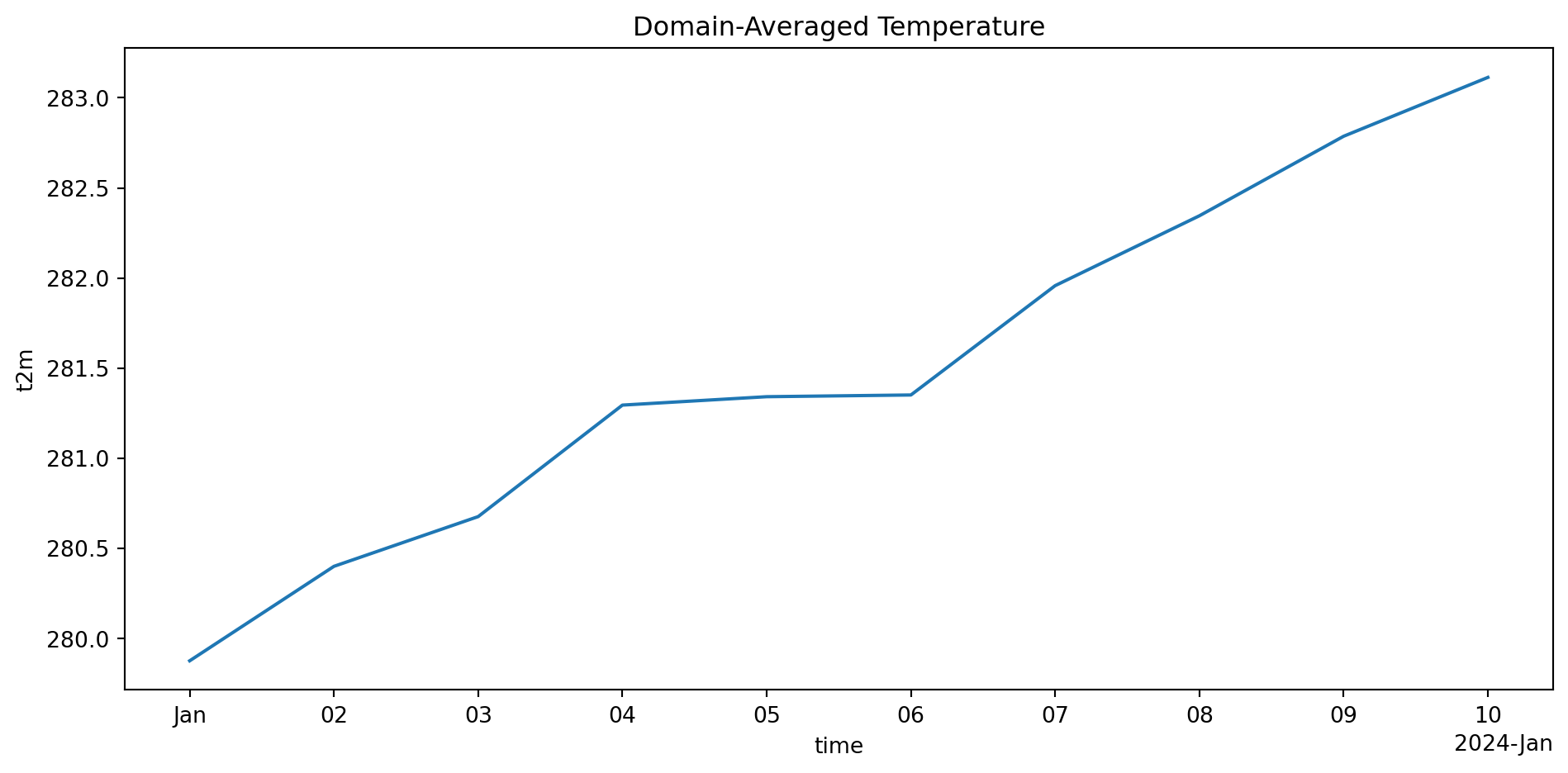
xarray has intelligent default plotting:

import matplotlib.pyplot as plt

# 1D plot (time series)
spatial_avg = ds['TREFHT'].mean(dim=['latitude', 'longitude'])
spatial_avg.plot()
plt.title('Domain-Averaged 2m Temperature (TREFHT)')
plt.tight_layout()
plt.show()
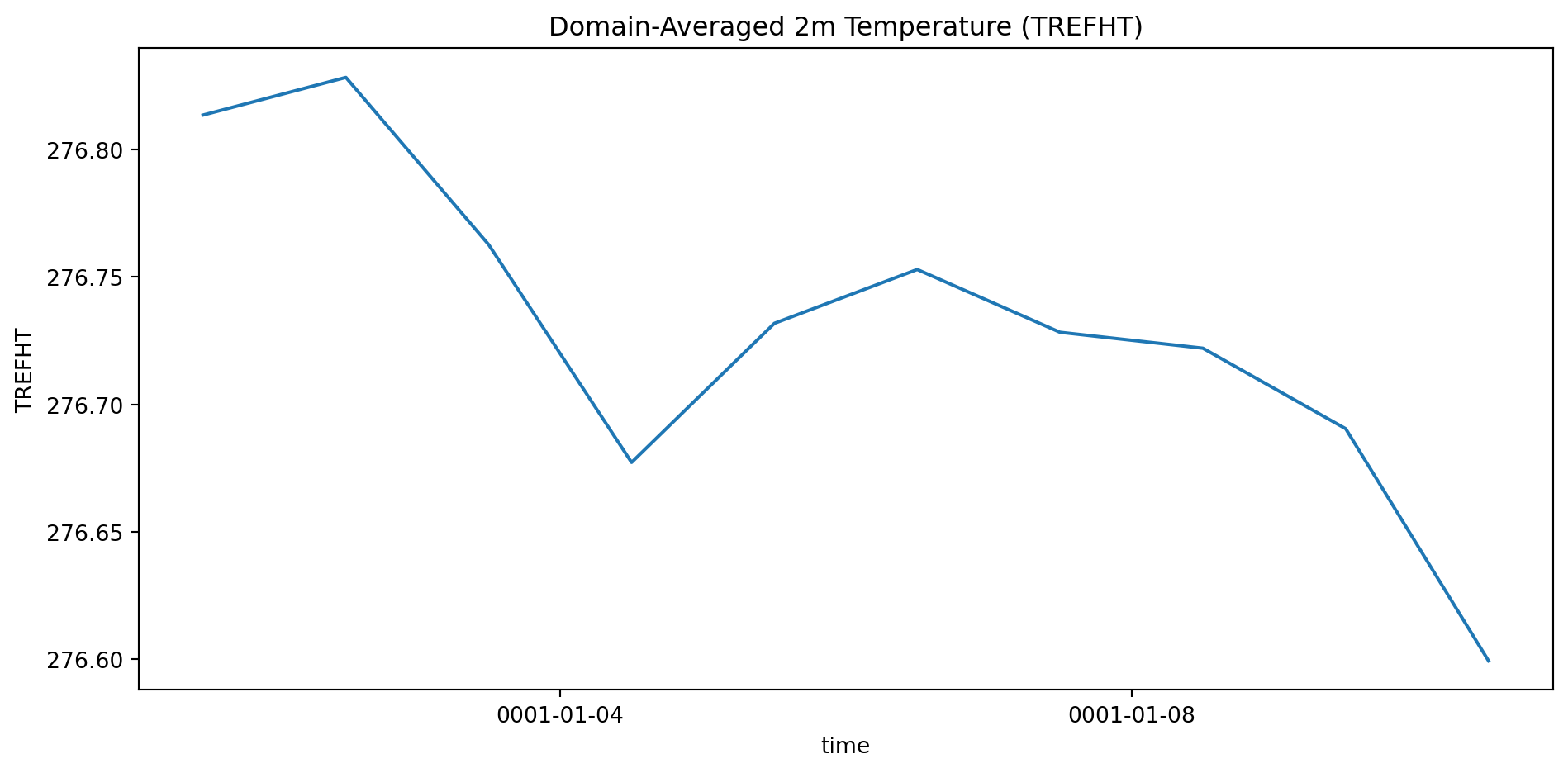
xarray automatically:

  • Uses coordinate values on axes (not indices!)
  • Labels axes with dimension names and units
  • Adds colorbar for 2D plots

2D Spatial Plot

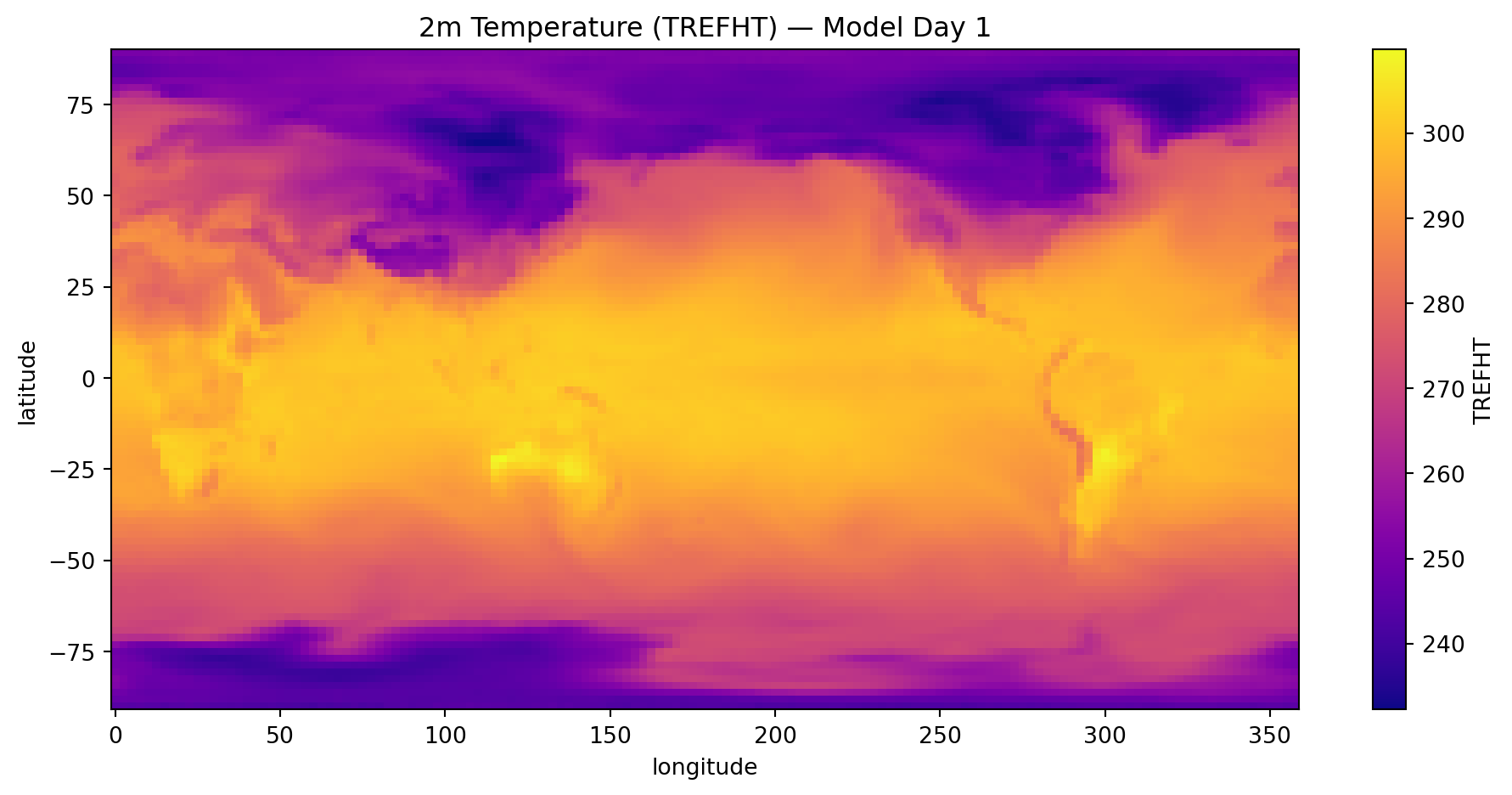
# Select one time step and plot
ds['TREFHT'].isel(time=0).plot(cmap='plasma')
plt.title('2m Temperature (TREFHT) — Model Day 1')
plt.tight_layout()
plt.show()
Customizing Plots

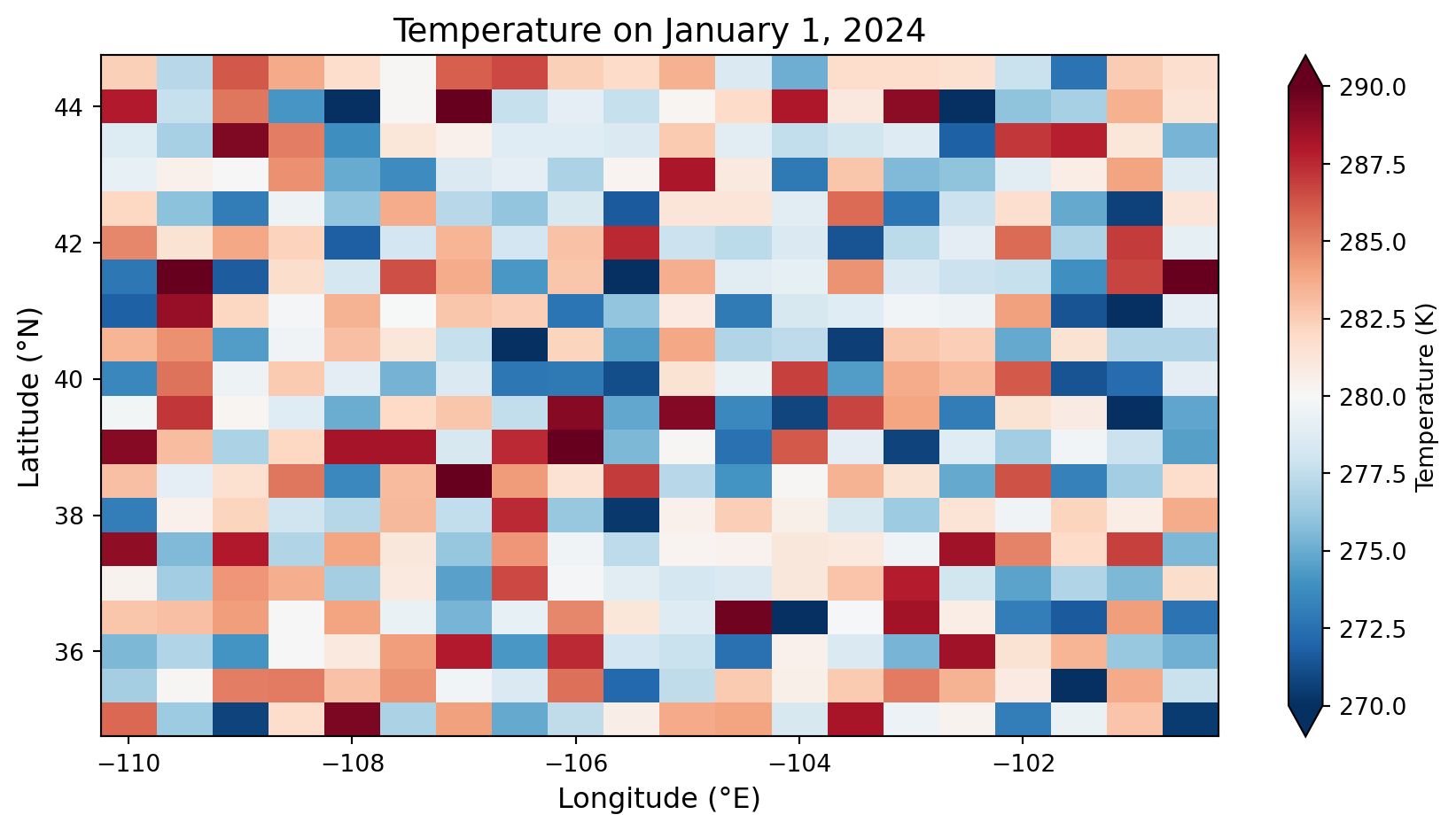
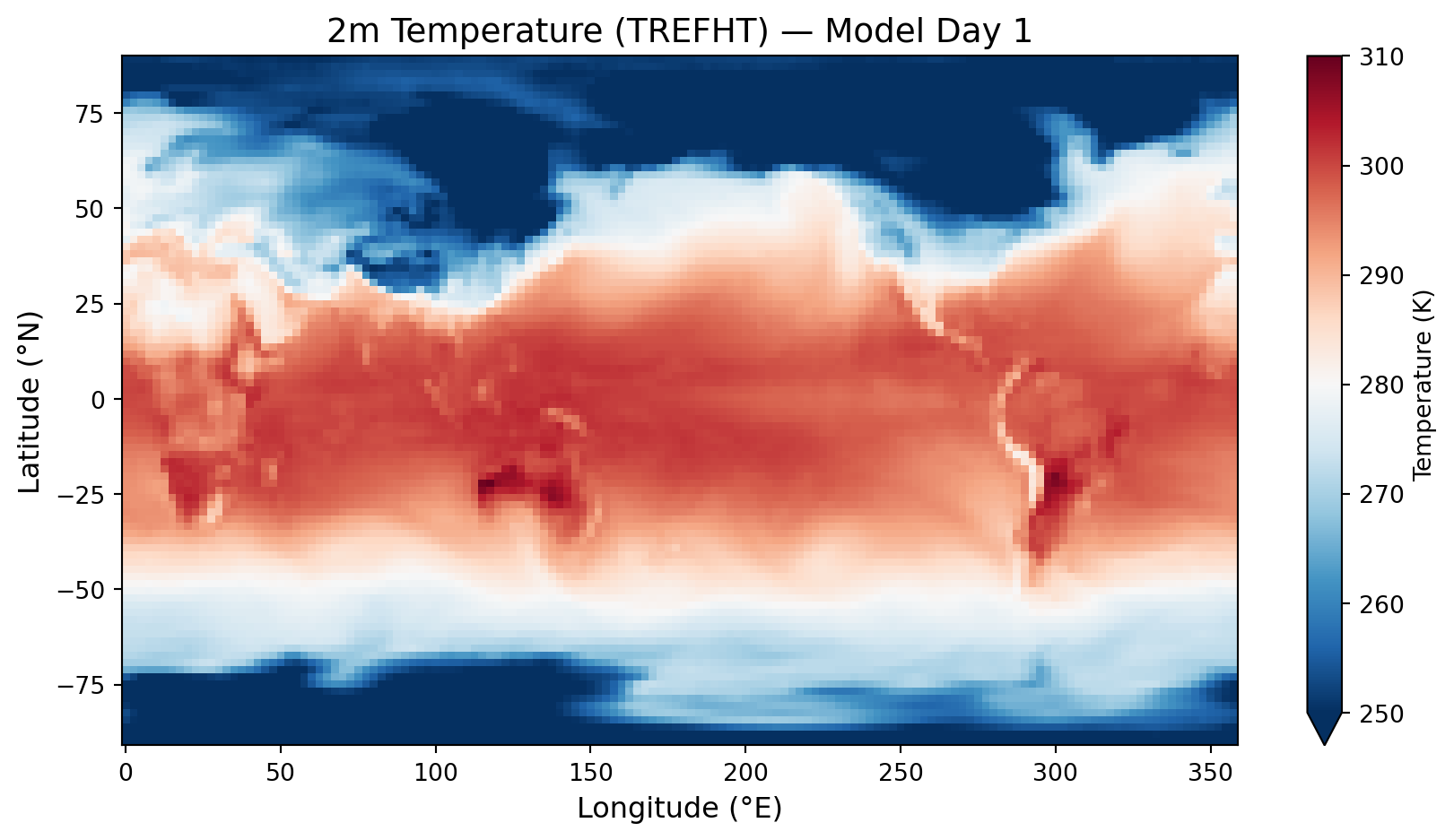
# More control over appearance
fig, ax = plt.subplots(figsize=(9, 5))

ds['TREFHT'].isel(time=0).plot(
    ax=ax,
    cmap='RdBu_r',
    vmin=250,
    vmax=310,
    cbar_kwargs={'label': 'Temperature (K)'}
)

ax.set_title('2m Temperature (TREFHT) — Model Day 1', fontsize=14)
ax.set_xlabel('Longitude (°E)', fontsize=12)
ax.set_ylabel('Latitude (°N)', fontsize=12)
plt.tight_layout()
plt.show()
Cartopy: Publication Maps

Why Cartopy?

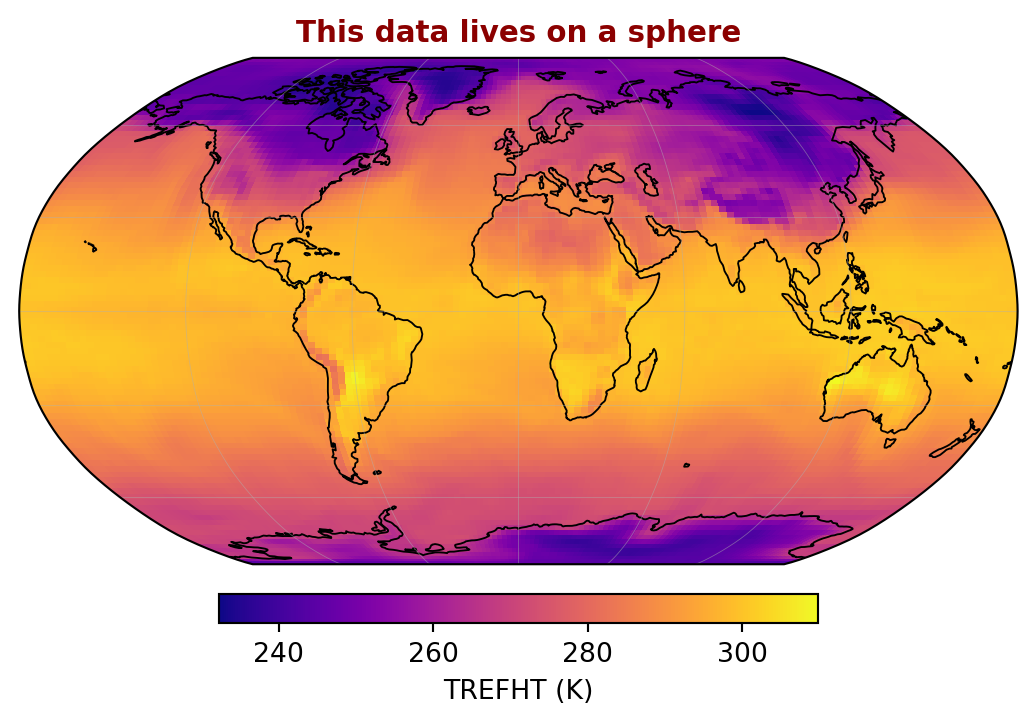
xarray’s .plot() draws a flat grid — cartopy adds real map projections:

xarray default:

ds['TREFHT'].isel(time=0).plot()
# ✓ Quick and easy
# ✗ No coastlines
# ✗ No projection (flat lat/lon)
# ✗ Not publication-ready

xarray + cartopy:

import cartopy.crs as ccrs
import cartopy.feature as cfeature

fig, ax = plt.subplots(
    subplot_kw={'projection': ccrs.Robinson()}
)
ds['TREFHT'].isel(time=0).plot(
    ax=ax, transform=ccrs.PlateCarree()
)
ax.coastlines()

Two key concepts:

  • CRS (Coordinate Reference System) — the mathematical framework defining how coordinates map onto Earth’s surface (e.g., “these numbers are WGS84 lat/lon degrees”)
  • projection — the CRS used to display the map on screen (Robinson, Orthographic, …)
  • transform — the CRS your data is already in. For lat/lon NetCDF grids, this is almost always ccrs.PlateCarree()

Mental model — always ask two questions:

1. What CRS is my data in?          → set transform=
   (almost always PlateCarree for lat/lon NetCDF)

2. How do I want to display the map? → set projection=
   (Robinson for global, LambertConformal for N. America, etc.)

Your data (lat/lon grid)
        |
        v  transform=ccrs.PlateCarree()   ← "what CRS is my data?"
   matplotlib axes
        |
        v  projection=ccrs.Robinson()     ← "how to draw the sphere?"
   final rendered map

Common mistake: forgetting transform= entirely → data plots in wrong location or not at all

Cartopy + xarray

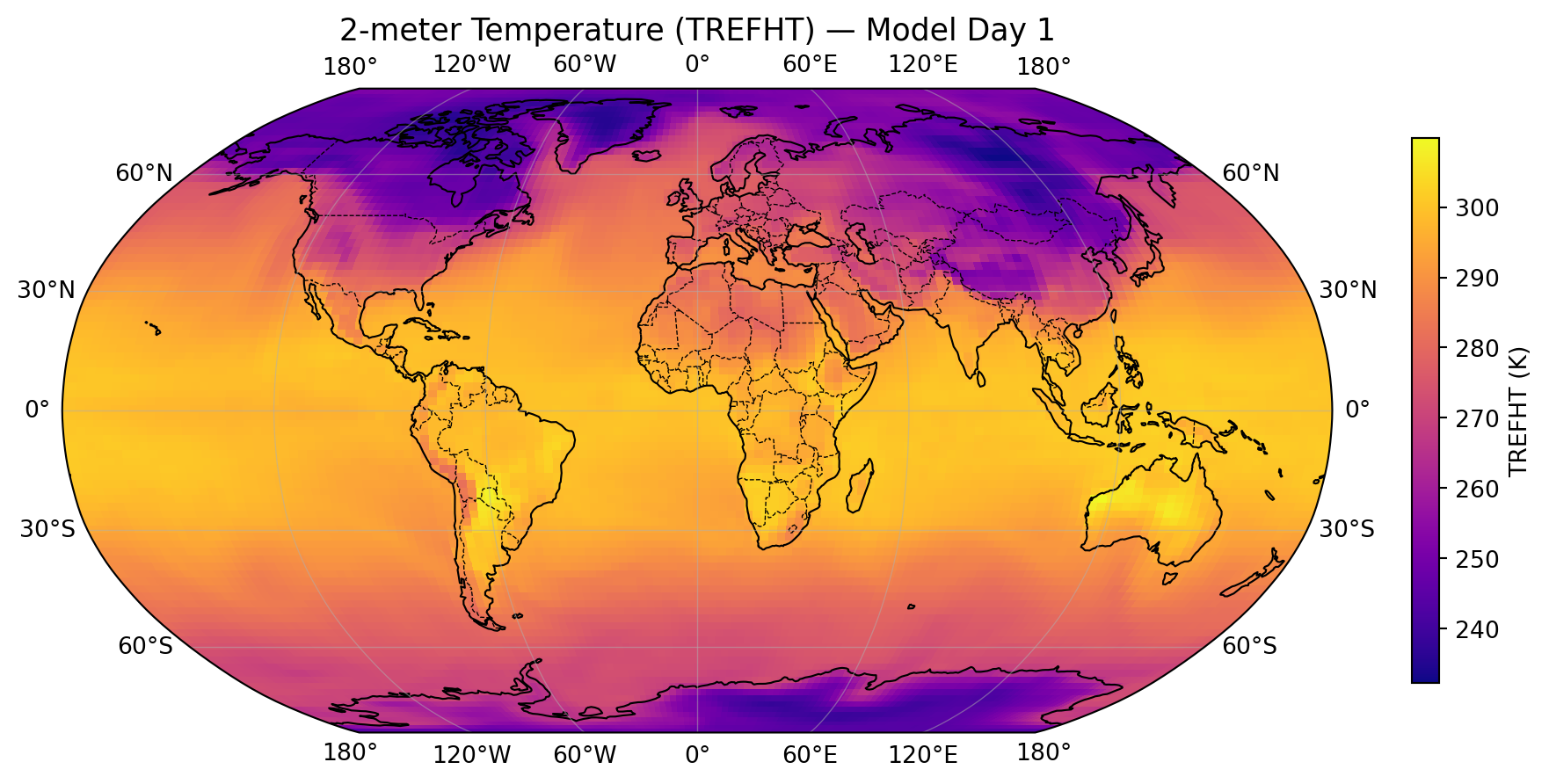
import cartopy.crs as ccrs
import cartopy.feature as cfeature
import matplotlib.pyplot as plt

fig, ax = plt.subplots(
    figsize=(10, 5),
    subplot_kw={'projection': ccrs.Robinson()}   # 1. Choose map projection
)

# 2. Plot xarray data — always set transform to your data's CRS
ds['TREFHT'].isel(time=0).plot(
    ax=ax,
    transform=ccrs.PlateCarree(),                # data is on regular lat/lon
    cmap='plasma',
    cbar_kwargs={'label': 'TREFHT (K)', 'shrink': 0.7}
)

# 3. Add geographic features
ax.coastlines(linewidth=0.8)
ax.add_feature(cfeature.BORDERS, linewidth=0.5, linestyle='--')
ax.add_feature(cfeature.LAND, facecolor='lightgray', alpha=0.3)
ax.gridlines(draw_labels=True, linewidth=0.5, alpha=0.5)

ax.set_title('2-meter Temperature (TREFHT) — Model Day 1', fontsize=13)
plt.tight_layout()
plt.show()
Common projections:

Projection ccrs. call Best for
Plate Carrée PlateCarree() Quick regional maps
Robinson Robinson() Global overview
Orthographic Orthographic(lon, lat) Hemisphere view
Lambert Conformal LambertConformal() Mid-latitude regional
North Polar Stereo NorthPolarStereo() Arctic/sea ice

Try It Yourself 💻 — Cartopy

Make a publication-quality precipitation map:

import cartopy.crs as ccrs
import cartopy.feature as cfeature
import matplotlib.pyplot as plt

# Load our CAMulator sample dataset
ds = xr.open_dataset('camulator_sample.nc')

# Tasks:
# 1. Plot the time-mean PRECT using a Robinson projection
# 2. Choose a good sequential colormap for precipitation (hint: 'GnBu' or 'Blues')
# 3. Place the colorbar horizontally below the map
# 4. Add coastlines and gridlines
# 5. Bonus: try switching to ccrs.Orthographic(-105, 40) (centered on Boulder!)

Hint — colorbar placement:

fig, ax = plt.subplots(figsize=(10, 5),
                        subplot_kw={'projection': ccrs.Robinson()})
ds['PRECT'].mean('time').plot(
    ax=ax, transform=ccrs.PlateCarree(),
    cmap='GnBu',
    cbar_kwargs={'label': 'Precipitation (m/s)', 'shrink': 0.6,
                 'orientation': 'horizontal', 'pad': 0.05}
)
ax.coastlines(); ax.gridlines(draw_labels=True)
plt.show()

Advanced Topics

Lazy Loading with Dask

Remember the scenario from slide 2? Temperature(time, level, lat, lon) over 45 years of ERA5 — ~50 GB for a single variable. You can’t np.load() your way out of that.

Solution: xarray + dask = lazy loading (read only what you need, when you need it)

# Open dataset lazily (doesn't load into memory yet)
ds = xr.open_dataset('ERA5_50GB.nc', chunks={'time': 100})

# Compute only what you need
# This reads only the required chunks from disk
time_mean = ds['t2m'].mean(dim='time').compute()

# ++! You never loaded all 50 GB into memory!

When to use chunks:

  • File larger than your RAM
  • Only need a subset of data
  • Want parallel computation

When NOT to chunk:

  • Small files (< 1 GB)
  • Need all data anyway
  • Adds overhead for small operations

Combining Multiple Files

Common scenario: One file per year

# XX! Don't do this manually
ds_2020 = xr.open_dataset('ERA5_2020.nc')
ds_2021 = xr.open_dataset('ERA5_2021.nc')
ds_2022 = xr.open_dataset('ERA5_2022.nc')
combined = xr.concat([ds_2020, ds_2021, ds_2022], dim='time')

# ++! Use open_mfdataset (multi-file dataset)
ds = xr.open_mfdataset(
    'ERA5_*.nc',
    combine='by_coords',
    parallel=True
)
# Automatically combines all matching files!

open_mfdataset benefits:

  • Handles hundreds of files
  • Lazy loading (doesn’t read all at once)
  • Parallel reading
  • Automatic coordinate alignment

Summary & Best Practices

When to Use Each Tool

Decision guide:

Data Type Tool Why
Single station time series Pandas 1D data, time indexing
CSV with multiple stations Pandas Tabular, mixed types
Gridded 3D+ data (NetCDF) xarray Multi-dimensional, coordinates
Climate model output xarray 4D+ (time, lat, lon, level)
Reanalysis (ERA5, MERRA) xarray Gridded, self-describing
Pure numerical computation NumPy Matrix ops, FFT, linear algebra
Image processing NumPy/xarray Arrays, but xarray if georeferenced

LAB 5

Due Friday at 9pm:

  • Lab 5: xarray time series

Lab 5 goal: Build a time series of a spatially domain-averaged field from a NetCDF file

You will:

  1. Open camulator_sample.nc with xr.open_dataset()
  2. Explore its structure — dims, coords, variables
  3. Select a geographic region using .sel()
  4. Average over latitude and longitude → one value per time step
  5. Plot the resulting time series
  6. Compute the anomaly (each time step minus the time mean) and plot it
  7. Make a Robinson projection map of time-mean PRECT (precipitation) — pick a sequential colormap, place the colorbar inside the map axes

Start early! Multi-dimensional data takes practice to visualize mentally.

Resources and Support

Documentation:

Support:

  • Office hours (bring your NetCDF questions!)
  • Lab notebooks with step-by-step examples
  • Discussion channels
  • Stack Overflow: [xarray] tag

Learning tips:

  1. Always print(ds) to see structure before working
  2. Use tab-completion for dimension names
  3. Keep data as xarray objects as long as possible
  4. Visualize often—plotting helps you understand the data
  5. Start with small subsets, then scale up

Questions?

Contact

Prof. Will Chapman

📧 wchapman@colorado.edu

🌐 willychap.github.io

🏢 ATOC Building, CU Boulder

Office Hours: Tu/Th 11:15-12:15p

See you next week!