ATOC 4815/5815

Multi-Dimensional Data with xarray - Week 5

Will Chapman

CU Boulder ATOC

2026-01-01

Multi-Dimensional Data & xarray

Today’s Objectives

  • Understanding xarray: from tables to N-dimensional grids
  • Working with dimensions, coordinates, and attributes
  • Reading and exploring NetCDF files
  • Selecting data by label and position
  • Computing climatologies and seasonal averages
  • Automatic alignment and broadcasting
  • Creating publication-quality maps and time series
  • Avoiding common dimension/coordinate errors

Reminders

Due Friday at 9pm:

  • Lab 5
  • HW5

Office Hours:

Will: Tu / Th 11:15-12:15p

Aiden: M / W 4-5p

The Real Problem

Your Research Scenario

Imagine: You’re analyzing the 2023 North American heat wave using ERA5 reanalysis data

Your data:

  • 4D gridded dataset: temperature(time, level, lat, lon)
  • Spatial coverage: North America (15°N-70°N, 130°W-60°W)
  • Temporal: January 1979 - December 2023 (45 years, daily data = 16,425 days)
  • Vertical: 37 pressure levels (1000 hPa to 1 hPa)
  • Grid resolution: 0.25° × 0.25° (~25 km)
  • File size: ~50 GB for temperature alone

Questions you need to answer:

  1. What was the maximum temperature in Boulder during summer 2023?
  2. How does 2023 compare to the 1991-2020 climatology?
  3. What’s the vertical temperature profile during the heat wave?
  4. Where was the heat wave most intense (spatial pattern)?
  5. Has the frequency of heat waves increased over 45 years?

Why Pandas Falls Short

Try solving this with Pandas…

Problem 1: Pandas is 2D (rows × columns)

# Your data is 4D: time × level × lat × lon
# Shape: (16425, 37, 221, 281) = 33.8 billion values!

# Pandas can only handle 2D tables
df = pd.DataFrame(temperature_data)  # ❌ How do you even structure this?

Problem 2: No concept of dimensions

# Which axis is time? Which is latitude?
# Have to remember: axis=0 is time, axis=1 is level, axis=2 is lat...
# One mistake and you're averaging across the wrong dimension!

mean_temp = df.mean(axis=2)  # ❌ Was that lat or lon? Who knows!

Problem 3: No coordinate-based selection

# Want temperature at 500 hPa over Boulder (40°N, 105°W)?
# With pandas, you need to:
# 1. Find the index closest to 500 hPa
# 2. Find the index closest to 40°N
# 3. Find the index closest to 105°W
# 4. Manually slice the array
# This is 15+ lines of error-prone index math!

Why NumPy Falls Short

NumPy can handle N-dimensional arrays, but…

Problem 1: No labels on dimensions

# NumPy array: shape (16425, 37, 221, 281)
temp = np.array(...)

# Which dimension is which?
temp.mean(axis=1)  # ❌ Is axis=1 pressure levels or latitude?
# You have to look at your notes every single time!

Problem 2: No coordinate values

# Want data at 40°N, 105°W, 500 hPa?
# Have to manually compute indices:
lat_idx = np.argmin(np.abs(lat_array - 40.0))
lon_idx = np.argmin(np.abs(lon_array - -105.0))
lev_idx = np.argmin(np.abs(level_array - 500.0))

temp_point = temp[:, lev_idx, lat_idx, lon_idx]  # ❌ Easy to mix up order!

Problem 3: Metadata gets lost

# After slicing, you lose track of what the data represents
subset = temp[100:200, 10, :, :]  # What dates? What pressure level?
# No units, no coordinate info, no variable name—just numbers

What xarray Gives Us

xarray = “Pandas for multi-dimensional arrays”

1. Named dimensions:

# Dimensions have names, not just axis numbers
temp.mean(dim='level')  # ✅ Crystal clear: averaging over pressure levels
temp.mean(dim='time')   # ✅ Time average

2. Coordinate-based selection:

# Select by actual coordinate values, not indices
temp.sel(lat=40, lon=-105, level=500, method='nearest')  # ✅ That easy!

3. Automatic alignment:

# Subtract climatology from daily data—xarray aligns by coordinates automatically
anomaly = temp_daily - temp_climatology  # ✅ Just works!

4. Metadata preservation:

# Units, long_names, coordinates all travel with the data
print(temp.attrs['units'])  # 'Kelvin'
print(temp.coords['time'])  # Full date range

Bottom line: For gridded climate/atmospheric data, xarray is essential. It combines NumPy’s N-D power with Pandas’ labeled axis convenience.

Mental Model: NumPy → Pandas → xarray

Think of the progression:

NumPy:        "Calculator for N-D arrays of numbers"
              ✅ Fast math, any number of dimensions
              ❌ No dimension names, no coordinates, no metadata

Pandas:       "Spreadsheet with labeled rows & columns"
              ✅ Named columns, time indexing, metadata
              ❌ Only 2D (rows × columns)

xarray:       "Pandas for N-dimensional grids"
              ✅ Named dimensions (time, lat, lon, level)
              ✅ Coordinate-based selection
              ✅ Metadata preservation (units, attrs)
              ✅ Built on NumPy + Pandas

Use xarray when:

  • Working with gridded data (NetCDF, GRIB, HDF5)
  • Data has 3+ dimensions (time, lat, lon, level, ensemble, …)
  • Need to select by coordinate values (time, latitude, pressure)
  • Want metadata to travel with your data
  • Doing climatology, anomalies, seasonal averages

Check Your Understanding

Which tool should you use for each task?

1. ERA5 temperature data: (time, level, lat, lon)

Answer: xarray (4D gridded data with coordinates)

2. Single station hourly time series: temp, humidity, wind

Answer: Pandas (1D time series, tabular data)

3. Matrix multiplication for linear algebra

Answer: NumPy (pure numerical computation)

4. Climate model output: temp(time, ensemble, lat, lon)

Answer: xarray (4D with named dimensions and coordinates)

5. CSV file with station metadata (name, lat, lon, elevation)

Answer: Pandas (2D table with mixed types)

xarray Fundamentals

DataArray: Core Building Block

A DataArray is an N-D array with:

  • Data: The actual values (NumPy array)
  • Dimensions: Names for each axis (‘time’, ‘lat’, ‘lon’, …)
  • Coordinates: Values along each dimension
  • Attributes: Metadata (units, long_name, …)
import numpy as np
import xarray as xr
import pandas as pd

# Create a simple DataArray
time = pd.date_range('2024-01-01', periods=5, freq='D')
lat = [40, 41, 42]
lon = [-105, -104, -103]

# 3D temperature data: (time, lat, lon)
data = 15 + 10 * np.random.rand(5, 3, 3)

temp = xr.DataArray(
    data,
    dims=['time', 'lat', 'lon'],
    coords={'time': time, 'lat': lat, 'lon': lon},
    attrs={'units': 'Celsius', 'long_name': 'Air Temperature'}
)

print(temp)
<xarray.DataArray (time: 5, lat: 3, lon: 3)> Size: 360B
array([[[21.43584666, 24.48632392, 16.24373298],
        [23.22320325, 18.12409718, 16.86986196],
        [19.49315039, 16.79073678, 15.76890019]],

       [[18.31931598, 20.51058129, 17.30315889],
        [17.65150494, 23.33230677, 22.7951566 ],
        [17.98248622, 22.74806692, 23.99169373]],

       [[20.53835581, 20.94586956, 23.37824259],
        [17.99678811, 16.12198984, 19.80651075],
        [23.14782396, 15.67719492, 20.75047811]],

       [[23.41487676, 16.79925276, 21.36455339],
        [22.4690283 , 24.82604108, 18.9316801 ],
        [16.86406489, 17.58184188, 22.05030929]],

       [[24.19613301, 15.8353819 , 17.08953215],
        [19.25911222, 18.17869189, 15.10887407],
        [15.07284831, 24.05154683, 16.39320577]]])
Coordinates:
  * time     (time) datetime64[ns] 40B 2024-01-01 2024-01-02 ... 2024-01-05
  * lat      (lat) int64 24B 40 41 42
  * lon      (lon) int64 24B -105 -104 -103
Attributes:
    units:      Celsius
    long_name:  Air Temperature

Anatomy of a DataArray

print("Dimensions:", temp.dims)
print("\nShape:", temp.shape)
print("\nCoordinates:")
print(temp.coords)
print("\nAttributes:")
print(temp.attrs)
print("\nFirst time step:")
print(temp.isel(time=0))
Dimensions: ('time', 'lat', 'lon')

Shape: (5, 3, 3)

Coordinates:
Coordinates:
  * time     (time) datetime64[ns] 40B 2024-01-01 2024-01-02 ... 2024-01-05
  * lat      (lat) int64 24B 40 41 42
  * lon      (lon) int64 24B -105 -104 -103

Attributes:
{'units': 'Celsius', 'long_name': 'Air Temperature'}

First time step:
<xarray.DataArray (lat: 3, lon: 3)> Size: 72B
array([[21.43584666, 24.48632392, 16.24373298],
       [23.22320325, 18.12409718, 16.86986196],
       [19.49315039, 16.79073678, 15.76890019]])
Coordinates:
    time     datetime64[ns] 8B 2024-01-01
  * lat      (lat) int64 24B 40 41 42
  * lon      (lon) int64 24B -105 -104 -103
Attributes:
    units:      Celsius
    long_name:  Air Temperature

Key insight: Dimensions + Coordinates = Self-describing data

You always know what each axis represents and what values it contains!

Dataset: Collection of DataArrays

A Dataset is like a dictionary of DataArrays sharing dimensions:

# Create multiple variables
temp_data = 15 + 10 * np.random.rand(5, 3, 3)
precip_data = np.random.exponential(2, (5, 3, 3))

# Combine into Dataset
ds = xr.Dataset({
    'temperature': (['time', 'lat', 'lon'], temp_data,
                   {'units': 'Celsius', 'long_name': 'Air Temperature'}),
    'precipitation': (['time', 'lat', 'lon'], precip_data,
                     {'units': 'mm', 'long_name': 'Total Precipitation'})
},
coords={'time': time, 'lat': lat, 'lon': lon}
)

print(ds)
<xarray.Dataset> Size: 808B
Dimensions:        (time: 5, lat: 3, lon: 3)
Coordinates:
  * time           (time) datetime64[ns] 40B 2024-01-01 ... 2024-01-05
  * lat            (lat) int64 24B 40 41 42
  * lon            (lon) int64 24B -105 -104 -103
Data variables:
    temperature    (time, lat, lon) float64 360B 24.19 20.28 ... 24.5 21.07
    precipitation  (time, lat, lon) float64 360B 1.887 1.438 ... 0.6246 2.302

Dataset Structure

# Access variables like dictionary keys
print("Temperature DataArray:")
print(ds['temperature'])

print("\n\nPrecipitation DataArray:")
print(ds['precipitation'])

# Or use dot notation
print("\n\nSame thing with dot notation:")
print(ds.temperature.mean())
Temperature DataArray:
<xarray.DataArray 'temperature' (time: 5, lat: 3, lon: 3)> Size: 360B
array([[[24.18608754, 20.28176421, 17.16478879],
        [23.06687118, 24.38172273, 24.64046265],
        [23.48016446, 18.88689874, 23.96676255]],

       [[15.19537927, 18.01858366, 19.28927842],
        [19.76573258, 18.49208451, 15.54791517],
        [18.09965469, 20.61519096, 17.38119462]],

       [[23.64961569, 23.18593103, 19.54058158],
        [21.24585295, 24.43662459, 18.32170199],
        [23.95501677, 23.15043525, 23.32147475]],

       [[17.45288467, 16.79798891, 22.93656129],
        [23.54138558, 19.68245708, 18.40534108],
        [16.76471393, 19.81381973, 21.24045988]],

       [[21.3350378 , 21.37273104, 21.65845495],
        [18.32945382, 18.94967611, 20.58885   ],
        [16.09708077, 24.50262242, 21.07450717]]])
Coordinates:
  * time     (time) datetime64[ns] 40B 2024-01-01 2024-01-02 ... 2024-01-05
  * lat      (lat) int64 24B 40 41 42
  * lon      (lon) int64 24B -105 -104 -103
Attributes:
    units:      Celsius
    long_name:  Air Temperature


Precipitation DataArray:
<xarray.DataArray 'precipitation' (time: 5, lat: 3, lon: 3)> Size: 360B
array([[[1.88674405, 1.43782739, 1.59354112],
        [5.30429364, 0.59128695, 1.95343244],
        [0.6116938 , 0.93847474, 2.94520381]],

       [[1.11000968, 0.83480255, 0.13099344],
        [1.97430954, 0.06207222, 0.21084233],
        [2.21141668, 3.58835418, 1.07955222]],

       [[1.72128364, 1.05487275, 1.00253472],
        [1.07669458, 0.0377066 , 2.10462897],
        [2.3853305 , 0.22950984, 0.52485821]],

       [[2.53531349, 2.70903096, 2.53371024],
        [1.91834439, 1.28611853, 0.22220806],
        [3.12698884, 0.1350904 , 1.53475348]],

       [[3.71987895, 5.12032168, 3.60362471],
        [3.51099752, 3.07879125, 6.52164632],
        [0.26326679, 0.62458492, 2.30219815]]])
Coordinates:
  * time     (time) datetime64[ns] 40B 2024-01-01 2024-01-02 ... 2024-01-05
  * lat      (lat) int64 24B 40 41 42
  * lon      (lon) int64 24B -105 -104 -103
Attributes:
    units:      mm
    long_name:  Total Precipitation


Same thing with dot notation:
<xarray.DataArray 'temperature' ()> Size: 8B
array(20.52915106)

Mental model:

  • DataArray = One variable (like a Pandas Series with N dimensions)
  • Dataset = Multiple variables (like a Pandas DataFrame with N dimensions)

Common Error: Dimension Name Mismatch

Predict the output:

temp = xr.DataArray(
    np.random.rand(5, 3),
    dims=['time', 'lat'],
    coords={'time': range(5), 'lat': [40, 41, 42]}
)

# Try to select by 'latitude' instead of 'lat'
subset = temp.sel(latitude=40)
ValueError: 'latitude' is not a valid dimension or coordinate

Explanation: Dimension name was ‘lat’, not ‘latitude’—exact match required!

The Fix:

# Always check dimension names first
print(temp.dims)  # ('time', 'lat')

# Use the correct name
subset = temp.sel(lat=40, method='nearest')  # ✅ Works!

Common causes:

  • Typos: ‘latitude’ vs ‘lat’, ‘longitude’ vs ‘lon’
  • Different conventions: ‘lev’ vs ‘level’ vs ‘plev’
  • Always use print(data.dims) to check!

Try It Yourself 💻

With your neighbor (5 min): Create your first DataArray

# Create a DataArray for wind speed
# Dimensions: time (3 days), lat (2 points), lon (2 points)
# Use realistic Boulder coordinates: lat=[40, 40.5], lon=[-105, -104.5]

import xarray as xr
import numpy as np
import pandas as pd

# Your code here:
# 1. Create time coordinate (3 days starting 2024-01-01)
# 2. Create spatial coordinates
# 3. Create random wind data (3 x 2 x 2)
# 4. Build DataArray with appropriate dims, coords, and attrs
# 5. Print it and verify the structure
# 6. Try selecting the first time step

Answer:

time = pd.date_range('2024-01-01', periods=3, freq='D')
lat = [40.0, 40.5]
lon = [-105.0, -104.5]

wind_data = 5 + 10 * np.random.rand(3, 2, 2)

wind = xr.DataArray(
    wind_data,
    dims=['time', 'lat', 'lon'],
    coords={'time': time, 'lat': lat, 'lon': lon},
    attrs={'units': 'm/s', 'long_name': 'Wind Speed'}
)

print(wind)
print("\nFirst time step:")
print(wind.isel(time=0))

Reading NetCDF Files

What is NetCDF?

NetCDF (Network Common Data Form): Standard format for scientific array data

Used by:

  • Climate models (CMIP, CESM, WRF)
  • Reanalysis (ERA5, MERRA-2, NCEP)
  • Satellite data (MODIS, GOES, GPM)
  • Observational datasets (ARGO, radiosondes)

Why NetCDF?

  • Self-describing (includes metadata)
  • Efficient compression
  • Platform-independent
  • Handles large datasets
  • Supports unlimited dimensions (e.g., growing time series)

xarray’s superpower: Native NetCDF support

ds = xr.open_dataset('ERA5_temperature.nc')  # That's it!

Opening NetCDF Files

# Create a sample NetCDF file first (simulating real data)
time = pd.date_range('2024-01-01', periods=10, freq='D')
lat = np.arange(35, 45, 0.5)
lon = np.arange(-110, -100, 0.5)

# Create realistic temperature data
# Seasonal cycle (10,) → broadcast to (10, 1, 1)
seasonal = 20 * np.sin(2 * np.pi * np.arange(10) / 365)[:, None, None]
temp_data = (
    280 +  # Base temperature in Kelvin
    seasonal +  # Seasonal cycle
    5 * np.random.randn(10, len(lat), len(lon))  # Noise
)

# Create Dataset
ds_example = xr.Dataset({
    't2m': (['time', 'lat', 'lon'], temp_data,
           {'units': 'K', 'long_name': '2-meter temperature'})
},
coords={
    'time': time,
    'lat': lat,
    'lon': lon
},
attrs={
    'source': 'Simulated ERA5-like data',
    'institution': 'CU Boulder ATOC'
}
)

# Save to file
ds_example.to_netcdf('/tmp/sample_era5.nc')

# Now open it (this is what you'd normally do)
ds = xr.open_dataset('/tmp/sample_era5.nc')
print(ds)
<xarray.Dataset> Size: 32kB
Dimensions:  (time: 10, lat: 20, lon: 20)
Coordinates:
  * time     (time) datetime64[ns] 80B 2024-01-01 2024-01-02 ... 2024-01-10
  * lat      (lat) float64 160B 35.0 35.5 36.0 36.5 37.0 ... 43.0 43.5 44.0 44.5
  * lon      (lon) float64 160B -110.0 -109.5 -109.0 ... -101.5 -101.0 -100.5
Data variables:
    t2m      (time, lat, lon) float64 32kB ...
Attributes:
    source:       Simulated ERA5-like data
    institution:  CU Boulder ATOC

Exploring Dataset Contents

# View all variables
print("Variables:", list(ds.data_vars))

# View dimensions
print("\nDimensions:", dict(ds.dims))

# View coordinates
print("\nCoordinates:", list(ds.coords))

# Global attributes
print("\nGlobal attributes:", ds.attrs)

# Specific variable attributes
print("\nt2m attributes:", ds['t2m'].attrs)
Variables: ['t2m']

Dimensions: {'time': 10, 'lat': 20, 'lon': 20}

Coordinates: ['time', 'lat', 'lon']

Global attributes: {'source': 'Simulated ERA5-like data', 'institution': 'CU Boulder ATOC'}

t2m attributes: {'units': 'K', 'long_name': '2-meter temperature'}

Common Error: Forgetting to Close Files

Predict the problem:

# Open large dataset
ds = xr.open_dataset('ERA5_50GB.nc')

# Do some analysis
mean_temp = ds['t2m'].mean()

# Try to delete or overwrite the file
os.remove('ERA5_50GB.nc')  # ❌ File is still open!
PermissionError: The file is being used by another process

The Fix: Use context manager

# ✅ Automatically closes file when done
with xr.open_dataset('ERA5_50GB.nc') as ds:
    mean_temp = ds['t2m'].mean()
    # File closes automatically here

# Or manually close
ds = xr.open_dataset('ERA5_50GB.nc')
mean_temp = ds['t2m'].mean()
ds.close()  # ✅ Explicit close

Best practice: Always use with xr.open_dataset(...) as ds: for safety

Selection & Indexing

Three Ways to Select Data

xarray provides three selection methods:

Method Selection By Example
.isel() Integer position (like NumPy) ds.isel(time=0) → first time
.sel() Label/coordinate value ds.sel(lat=40) → data at 40°N
.loc[] Label (pandas-style) ds.loc['2024-01-01']

When to use each:

  • isel: When you want “first 10 time steps” or “every 3rd latitude”
  • sel: When you want “data at 500 hPa” or “January 2024”
  • loc: Rarely used in xarray; .sel() is preferred

Selection by Position: .isel()

# Select first time step
first_time = ds['t2m'].isel(time=0)
print("First time step:")
print(first_time)

print("\n" + "="*60 + "\n")

# Select first 3 times, every 2nd latitude
subset = ds['t2m'].isel(time=slice(0, 3), lat=slice(0, None, 2))
print("Subset shape:", subset.shape)
print(subset)
First time step:
<xarray.DataArray 't2m' (lat: 20, lon: 20)> Size: 3kB
[400 values with dtype=float64]
Coordinates:
    time     datetime64[ns] 8B 2024-01-01
  * lat      (lat) float64 160B 35.0 35.5 36.0 36.5 37.0 ... 43.0 43.5 44.0 44.5
  * lon      (lon) float64 160B -110.0 -109.5 -109.0 ... -101.5 -101.0 -100.5
Attributes:
    units:      K
    long_name:  2-meter temperature

============================================================

Subset shape: (3, 10, 20)
<xarray.DataArray 't2m' (time: 3, lat: 10, lon: 20)> Size: 5kB
[600 values with dtype=float64]
Coordinates:
  * time     (time) datetime64[ns] 24B 2024-01-01 2024-01-02 2024-01-03
  * lat      (lat) float64 80B 35.0 36.0 37.0 38.0 39.0 40.0 41.0 42.0 43.0 44.0
  * lon      (lon) float64 160B -110.0 -109.5 -109.0 ... -101.5 -101.0 -100.5
Attributes:
    units:      K
    long_name:  2-meter temperature

Use .isel() when:

  • “Give me the first/last N time steps”
  • “Every 3rd grid point”
  • “Skip the first 10 latitudes”

Selection by Label: .sel()

# Select specific date
jan5 = ds['t2m'].sel(time='2024-01-05')
print("January 5, 2024:")
print(jan5)

print("\n" + "="*60 + "\n")

# Select spatial region
boulder_region = ds['t2m'].sel(
    lat=slice(39, 41),
    lon=slice(-106, -104)
)
print("Boulder region shape:", boulder_region.shape)
print(boulder_region)
January 5, 2024:
<xarray.DataArray 't2m' (lat: 20, lon: 20)> Size: 3kB
[400 values with dtype=float64]
Coordinates:
    time     datetime64[ns] 8B 2024-01-05
  * lat      (lat) float64 160B 35.0 35.5 36.0 36.5 37.0 ... 43.0 43.5 44.0 44.5
  * lon      (lon) float64 160B -110.0 -109.5 -109.0 ... -101.5 -101.0 -100.5
Attributes:
    units:      K
    long_name:  2-meter temperature

============================================================

Boulder region shape: (10, 5, 5)
<xarray.DataArray 't2m' (time: 10, lat: 5, lon: 5)> Size: 2kB
[250 values with dtype=float64]
Coordinates:
  * time     (time) datetime64[ns] 80B 2024-01-01 2024-01-02 ... 2024-01-10
  * lat      (lat) float64 40B 39.0 39.5 40.0 40.5 41.0
  * lon      (lon) float64 40B -106.0 -105.5 -105.0 -104.5 -104.0
Attributes:
    units:      K
    long_name:  2-meter temperature

Nearest Neighbor Selection

Problem: Your coordinates may not exactly match grid points

# Boulder coordinates: 40.0150°N, 105.2705°W
# Grid may not have exactly these values

# ❌ This might fail if 40.0150 isn't in the grid
# ds['t2m'].sel(lat=40.0150, lon=-105.2705)

# ✅ Find nearest grid point
boulder_temp = ds['t2m'].sel(
    lat=40.0150,
    lon=-105.2705,
    method='nearest'
)
print("Temperature at Boulder (nearest grid point):")
print(boulder_temp)
Temperature at Boulder (nearest grid point):
<xarray.DataArray 't2m' (time: 10)> Size: 80B
[10 values with dtype=float64]
Coordinates:
  * time     (time) datetime64[ns] 80B 2024-01-01 2024-01-02 ... 2024-01-10
    lat      float64 8B 40.0
    lon      float64 8B -105.5
Attributes:
    units:      K
    long_name:  2-meter temperature

method options:

  • 'nearest' - Closest value (most common)
  • 'pad' / 'ffill' - Forward fill
  • 'backfill' / 'bfill' - Backward fill

Common Error: isel vs sel Confusion

Predict the output:

ds = xr.Dataset(...)  # Has dims: time, lat, lon

# Try to select time=0 with .sel()
subset = ds.sel(time=0)
KeyError: 0
# or
ValueError: 0 is not in the time coordinates

Explanation: .sel() expects a coordinate value (e.g., a date), not an index!

The Fix:

# ❌ Wrong: 0 is an index, not a date
ds.sel(time=0)

# ✅ Right: Use .isel() for integer positions
ds.isel(time=0)

# ✅ Right: Use .sel() with actual coordinate value
ds.sel(time='2024-01-01')

Rule of thumb:

  • Index number (0, 1, 2, …) → .isel()
  • Coordinate value (date, lat, lon, pressure) → .sel()

Try It Yourself 💻

With your neighbor (5 min): Practice selection methods

# Using our sample dataset
ds = xr.open_dataset('/tmp/sample_era5.nc')

# Tasks:
# 1. Select the last time step using .isel()
# 2. Select all data from January 3rd using .sel()
# 3. Select temperature at lat=40°N, lon=-105°W (nearest)
# 4. Select a time slice: January 2-5
# 5. What happens if you try ds.sel(time=5)?  Why?

Answers:

# 1. Last time step
last = ds['t2m'].isel(time=-1)

# 2. January 3rd
jan3 = ds['t2m'].sel(time='2024-01-03')

# 3. Specific point (nearest neighbor)
point = ds['t2m'].sel(lat=40, lon=-105, method='nearest')

# 4. Time slice
jan2_to_5 = ds['t2m'].sel(time=slice('2024-01-02', '2024-01-05'))

# 5. This fails! Because 5 is an index, not a date
# ds.sel(time=5)  # KeyError: 5 not in time coordinates
# Should use: ds.isel(time=5) or ds.sel(time='2024-01-06')

Operations & Computations

Reductions Along Dimensions

Specify which dimension(s) to reduce over:

# Time mean (for each grid point)
time_mean = ds['t2m'].mean(dim='time')
print("Time-averaged temperature (one value per grid point):")
print(f"Shape: {time_mean.shape}")
print(time_mean)

print("\n" + "="*60 + "\n")

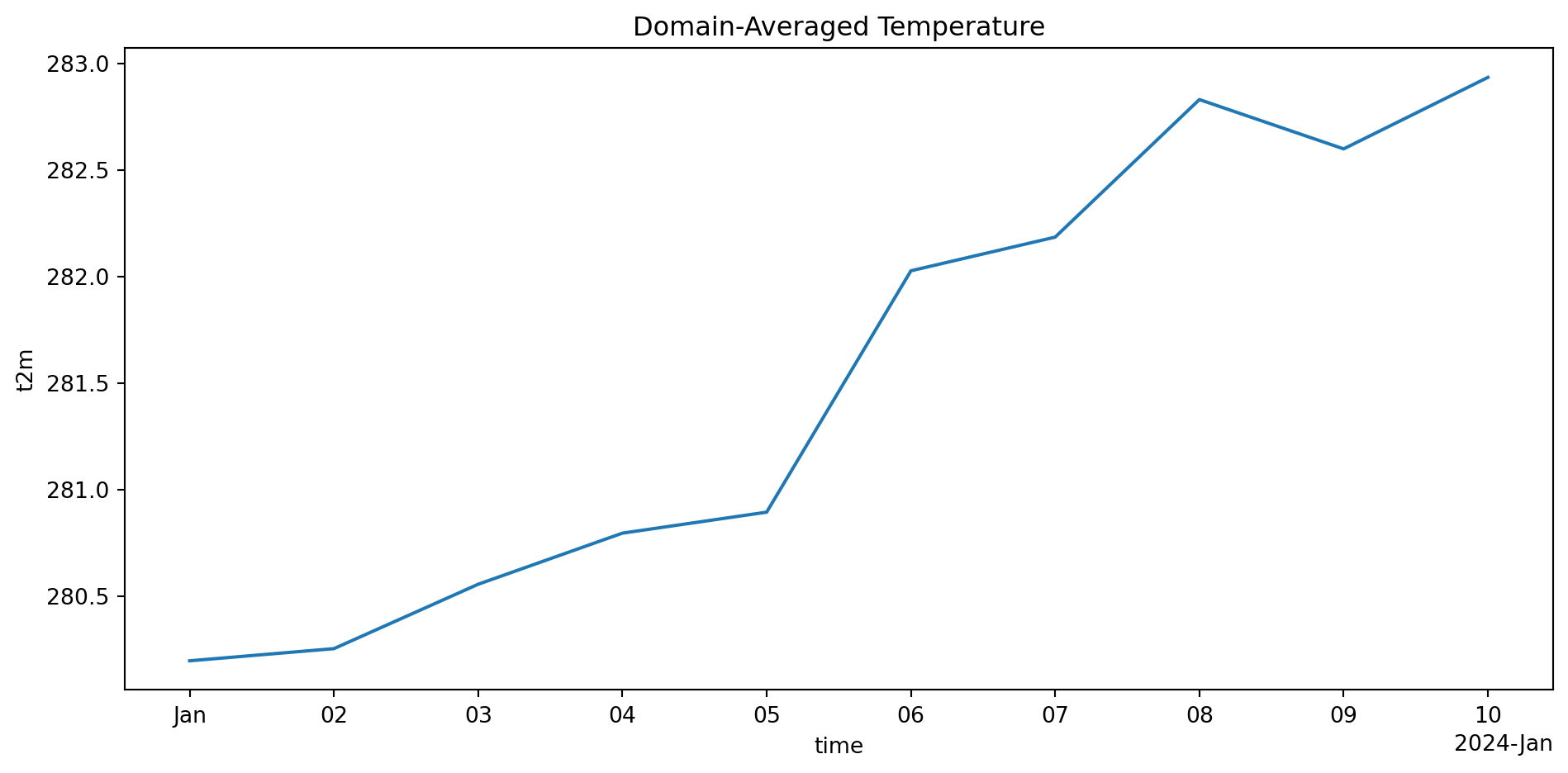
# Spatial mean (for each time)
spatial_mean = ds['t2m'].mean(dim=['lat', 'lon'])
print("Spatially-averaged temperature (time series):")
print(f"Shape: {spatial_mean.shape}")
print(spatial_mean.values)
Time-averaged temperature (one value per grid point):
Shape: (20, 20)
<xarray.DataArray 't2m' (lat: 20, lon: 20)> Size: 3kB
array([[282.95016093, 280.89146275, 282.92987734, 282.18446529,
        281.9163624 , 279.17275749, 280.46188229, 282.7009802 ,
        283.9097424 , 282.16910826, 282.23534972, 284.16110753,
        283.90468901, 281.69701869, 282.34402624, 282.46554851,
        280.95170723, 279.37403199, 280.18188218, 283.21890387],
       [281.94417328, 280.71404058, 283.42104346, 279.31909361,
        280.43035369, 279.92487045, 281.49591688, 280.65141843,
        282.94713475, 277.25357683, 286.61030546, 279.99478055,
        277.5936846 , 277.1806308 , 284.31984626, 281.05807772,
        280.88690891, 281.43662242, 283.68643826, 281.46243336],
       [281.24455241, 280.35374311, 279.0095925 , 282.43695453,
        283.84414698, 279.83168095, 283.7955555 , 282.05813444,
        279.0948227 , 283.54994253, 283.61240774, 280.96098939,
        280.83734289, 282.16873693, 279.19475947, 281.60478368,
        281.79459078, 280.44334631, 281.13545617, 280.62525431],
       [280.0331405 , 279.79089893, 280.58414591, 282.00861395,
        281.20489884, 281.29885952, 281.91657005, 285.80556213,
        281.33659019, 281.70972137, 280.65898988, 281.50628567,
        280.79164724, 279.54182928, 280.73679651, 282.12381174,
        278.79458495, 283.38941491, 280.7117928 , 280.18645189],
...
       [282.42122432, 278.83818414, 282.0115045 , 281.87996225,
        280.4114629 , 283.83099184, 280.8715608 , 281.83435073,
        283.40254374, 279.94933727, 281.7973382 , 283.69735299,
        282.9111315 , 283.10782647, 283.78383536, 283.16739661,
        281.82826946, 281.51768594, 280.42690522, 282.8241565 ],
       [280.1246556 , 283.87894807, 281.0858584 , 283.44059181,
        279.3791943 , 281.38574175, 282.55220456, 279.79567909,
        282.11533503, 283.00500077, 279.46426388, 280.39116076,
        283.98384106, 284.61595756, 283.93092454, 281.8484821 ,
        281.06897459, 282.94140921, 280.65976555, 282.07426535],
       [283.63038406, 282.89117102, 282.11304742, 282.65511783,
        279.82083733, 283.80846425, 280.96328814, 282.1858126 ,
        279.46277029, 281.95485843, 280.55003557, 280.38463827,
        285.08960994, 279.82119173, 282.57393005, 279.5028867 ,
        282.87543021, 281.91396951, 283.47264151, 284.13690638],
       [284.71527051, 281.18083897, 281.29592133, 282.59082684,
        281.11007545, 281.20492525, 281.28868226, 279.34990222,
        278.49496824, 283.32391102, 279.40231224, 281.36246582,
        279.95478438, 280.89766835, 283.10314706, 280.76502248,
        278.53584295, 279.71948551, 280.18614744, 283.23755639]])
Coordinates:
  * lat      (lat) float64 160B 35.0 35.5 36.0 36.5 37.0 ... 43.0 43.5 44.0 44.5
  * lon      (lon) float64 160B -110.0 -109.5 -109.0 ... -101.5 -101.0 -100.5

============================================================

Spatially-averaged temperature (time series):
Shape: (10,)
[280.19541284 280.25248145 280.55468    280.79452266 280.89300673
 282.02571815 282.18372755 282.82932531 282.59795186 282.93335992]
Key difference from NumPy:

  • NumPy: arr.mean(axis=1) → Have to remember which axis is which
  • xarray: da.mean(dim='lat') → Crystal clear!

Common Error: Wrong Dimension Name

Predict the output:

# Calculate time mean
temp = ds['t2m'].mean(dim='times')  # Typo: should be 'time'
ValueError: 'times' not found in array dimensions ('time', 'lat', 'lon')

The Fix:

# ✅ Check dimensions first
print(ds['t2m'].dims)  # ('time', 'lat', 'lon')

# ✅ Use exact dimension name
temp_mean = ds['t2m'].mean(dim='time')

Pro tip: Use tab completion! Type ds['t2m'].mean(dim=' then TAB to see options

GroupBy: Climatologies & Seasonal Averages

GroupBy allows you to split-apply-combine:

# Create longer dataset for demonstration
time_long = pd.date_range('2020-01-01', '2023-12-31', freq='D')
temp_long = 280 + 20 * np.sin(2 * np.pi * np.arange(len(time_long)) / 365) + np.random.randn(len(time_long))

ds_long = xr.Dataset({
    't2m': (['time'], temp_long)
}, coords={'time': time_long})

# Monthly climatology (average January, average February, ...)
monthly_clim = ds_long['t2m'].groupby('time.month').mean()
print("Monthly climatology (12 values, one per month):")
print(monthly_clim)

print("\n" + "="*60 + "\n")

# Seasonal averages
seasonal = ds_long['t2m'].groupby('time.season').mean()
print("Seasonal averages:")
print(seasonal)
Monthly climatology (12 values, one per month):
<xarray.DataArray 't2m' (month: 12)> Size: 96B
array([285.33777861, 294.05590604, 298.90061221, 299.19209672,
       294.14322989, 285.712159  , 275.05357467, 266.13018337,
       260.85508722, 260.90150629, 266.11117373, 274.92553479])
Coordinates:
  * month    (month) int64 96B 1 2 3 4 5 6 7 8 9 10 11 12

============================================================

Seasonal averages:
<xarray.DataArray 't2m' (season: 4)> Size: 32B
array([284.49021674, 275.5224051 , 297.39263051, 262.60367608])
Coordinates:
  * season   (season) object 32B 'DJF' 'JJA' 'MAM' 'SON'

Computing Anomalies

Anomaly = Actual - Climatology

# Compute monthly climatology
monthly_clim = ds_long['t2m'].groupby('time.month').mean()

# Compute anomalies (xarray aligns automatically!)
anomaly = ds_long['t2m'].groupby('time.month') - monthly_clim

print("Anomalies (first 10 days):")
print(anomaly.isel(time=slice(0, 10)).values)

print("\n" + "="*60 + "\n")

# Verify: anomalies should average to ~0
print(f"Mean anomaly: {anomaly.mean().values:.6f} (should be ≈0)")
Anomalies (first 10 days):
[-4.9119991  -4.24552618 -5.28928067 -4.29568542 -4.81444744 -3.17505537
 -3.52579836 -4.7835424  -2.05770323 -2.01301496]

============================================================

Mean anomaly: -0.000000 (should be ≈0)

Magic happening here:

  • monthly_clim has 12 values (one per month)
  • ds_long['t2m'] has 1461 values (4 years of daily data)
  • xarray automatically aligns by month when subtracting!
  • Each January gets January climatology subtracted, etc.

Automatic Alignment & Broadcasting

xarray automatically aligns data by coordinate labels:

# Create two DataArrays with different coordinates
temp1 = xr.DataArray(
    [10, 20, 30],
    dims=['lat'],
    coords={'lat': [40, 41, 42]}
)

temp2 = xr.DataArray(
    [5, 10],
    dims=['lat'],
    coords={'lat': [41, 42]}  # Only overlaps at 41, 42
)

# Addition automatically aligns by 'lat' coordinate
result = temp1 + temp2
print("Aligned addition:")
print(result)
Aligned addition:
<xarray.DataArray (lat: 2)> Size: 16B
array([25, 40])
Coordinates:
  * lat      (lat) int64 16B 41 42

Notice:

  • Only lat=41 and lat=42 overlap
  • lat=40 has no match → NaN
  • This prevents silent errors from misaligned data!

Check Your Understanding

What dimension(s) should you reduce over for each task?

1. Time series of domain-averaged temperature

Answer: .mean(dim=['lat', 'lon']) → keeps time dimension

2. Annual climatology (12 months) for each grid point

Answer: .groupby('time.month').mean() → groups by month, averages over years

3. Zonal mean (average over all longitudes)

Answer: .mean(dim='lon') → keeps lat and time

4. Single global mean temperature for each time

Answer: .mean(dim=['lat', 'lon']) → one value per time

Plotting with xarray

Built-in Plotting

xarray has intelligent default plotting:

import matplotlib.pyplot as plt

# 1D plot (time series)
spatial_avg = ds['t2m'].mean(dim=['lat', 'lon'])
spatial_avg.plot()
plt.title('Domain-Averaged Temperature')
plt.tight_layout()
plt.show()

xarray automatically:

  • Uses coordinate values on axes (not indices!)
  • Labels axes with dimension names and units
  • Adds colorbar for 2D plots

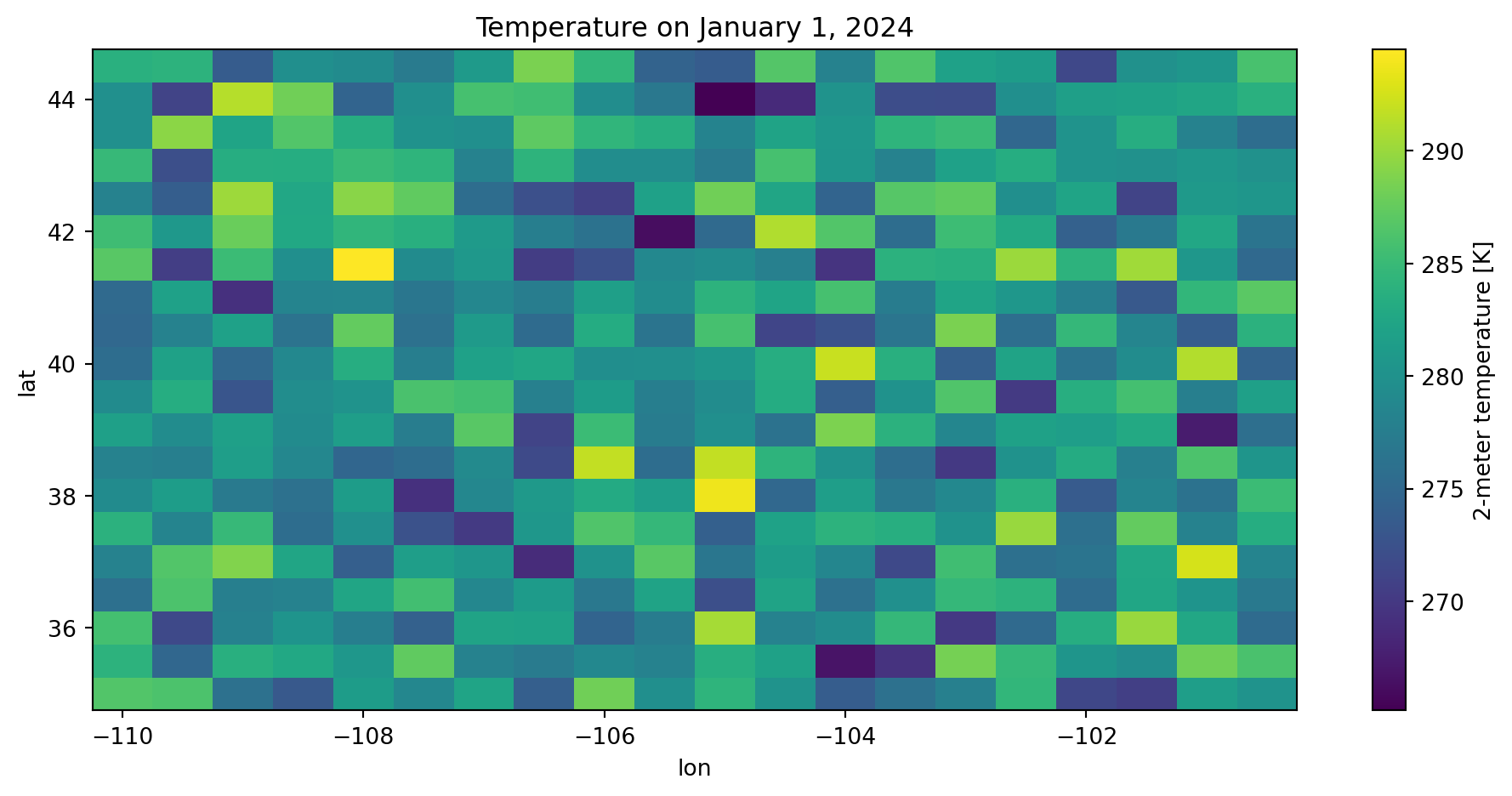
2D Spatial Plot

# Select one time step and plot
ds['t2m'].isel(time=0).plot()
plt.title('Temperature on January 1, 2024')
plt.tight_layout()
plt.show()

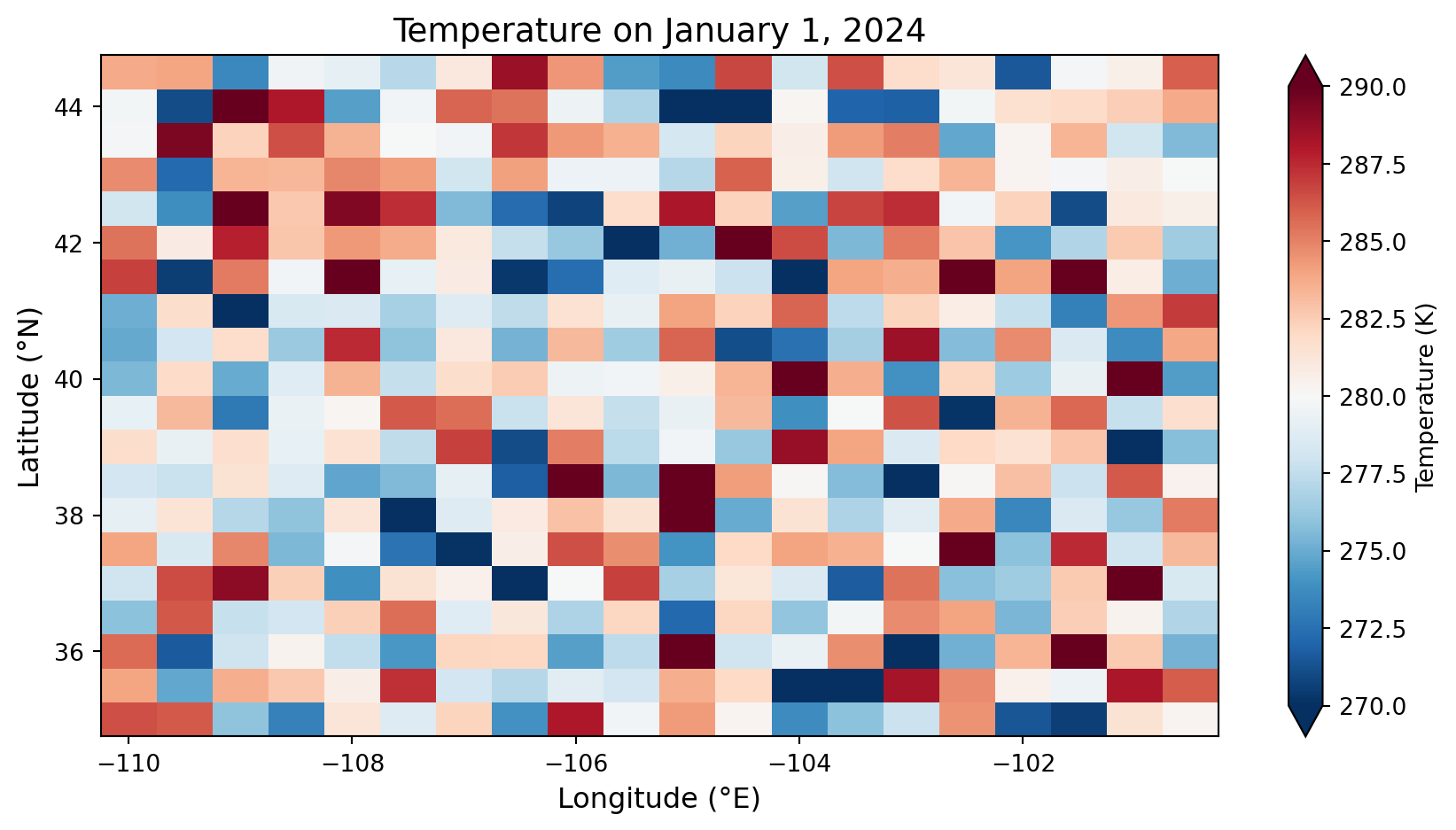
Customizing Plots

# More control over appearance
fig, ax = plt.subplots(figsize=(9, 5))

ds['t2m'].isel(time=0).plot(
    ax=ax,
    cmap='RdBu_r',
    vmin=270,
    vmax=290,
    cbar_kwargs={'label': 'Temperature (K)'}
)

ax.set_title('Temperature on January 1, 2024', fontsize=14)
ax.set_xlabel('Longitude (°E)', fontsize=12)
ax.set_ylabel('Latitude (°N)', fontsize=12)
plt.tight_layout()
plt.show()

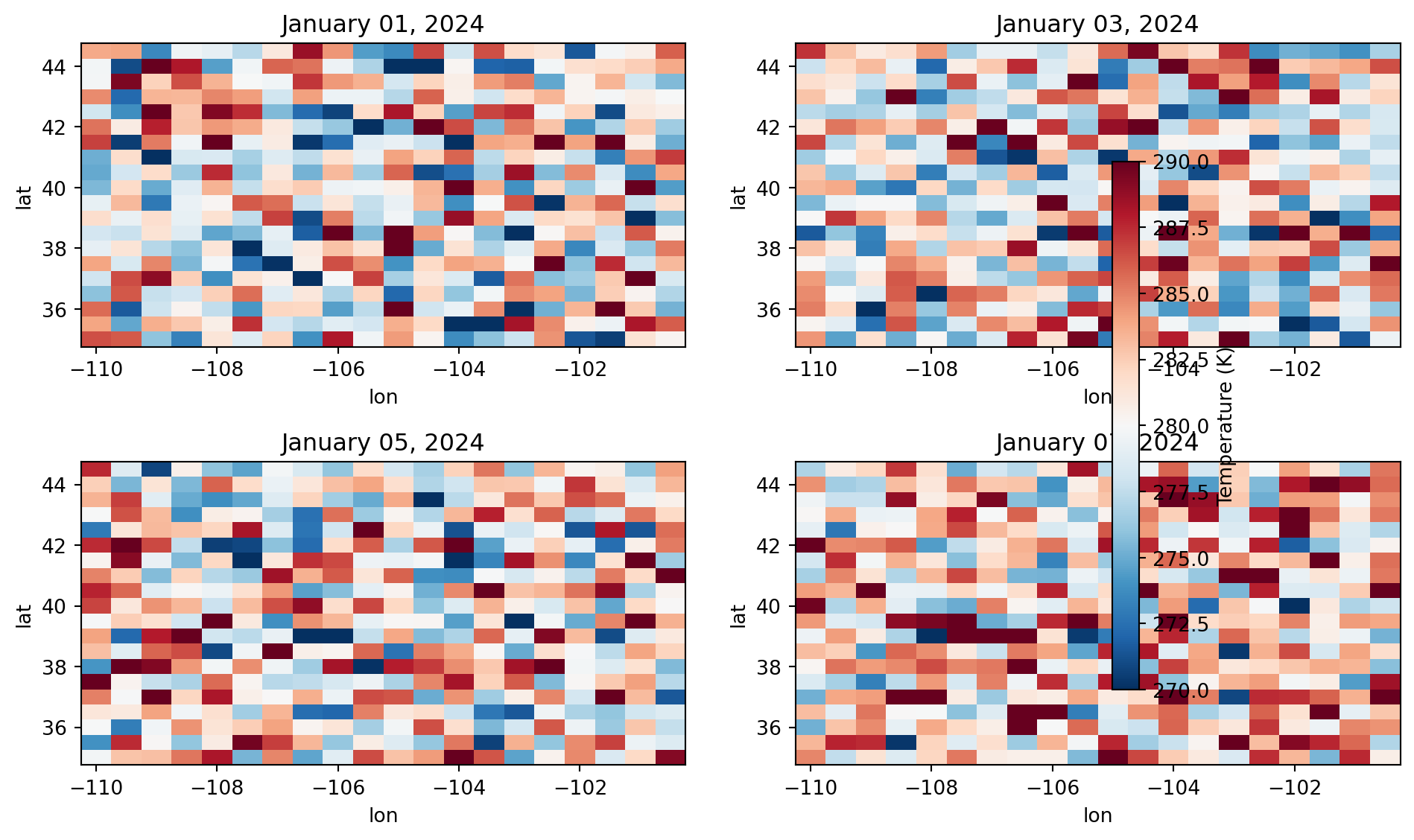
Multiple Panels

# Create 2x2 panel of different times
fig, axes = plt.subplots(2, 2, figsize=(10, 6))
axes = axes.flatten()

for i, ax in enumerate(axes):
    ds['t2m'].isel(time=i*2).plot(
        ax=ax,
        cmap='RdBu_r',
        vmin=270,
        vmax=290,
        add_colorbar=False
    )
    date = pd.to_datetime(ds['time'].isel(time=i*2).values)
    ax.set_title(f"{date.strftime('%B %d, %Y')}")

# Add single colorbar
fig.colorbar(ax.collections[0], ax=axes, label='Temperature (K)', shrink=0.8)
plt.tight_layout()
plt.show()

Advanced Topics

Lazy Loading with Dask

Problem: ERA5 file is 50 GB—won’t fit in memory!

Solution: xarray + dask = lazy loading

# Open dataset lazily (doesn't load into memory yet)
ds = xr.open_dataset('ERA5_50GB.nc', chunks={'time': 100})

# Compute only what you need
# This reads only the required chunks from disk
time_mean = ds['t2m'].mean(dim='time').compute()

# ✅ You never loaded all 50 GB into memory!

When to use chunks:

  • File larger than your RAM
  • Only need a subset of data
  • Want parallel computation

When NOT to chunk:

  • Small files (< 1 GB)
  • Need all data anyway
  • Adds overhead for small operations

Common Error: Using .values Too Early

Predict the problem:

# Load temperature data
temp = ds['t2m']

# Extract values immediately
temp_array = temp.values  # ❌ Loses all metadata!

# Later, try to select by coordinate
subset = temp_array.sel(lat=40)  # ❌ Won't work—it's just a NumPy array!
AttributeError: 'numpy.ndarray' object has no attribute 'sel'

Explanation: Once you call .values, you get a plain NumPy array—no coordinates, no dimensions, no metadata!

The Fix:

# ✅ Keep as xarray DataArray as long as possible
temp = ds['t2m']

# Do all selections and operations in xarray
subset = temp.sel(lat=40, method='nearest')
time_mean = subset.mean(dim='time')

# Only extract values at the very end if needed
final_array = time_mean.values  # Now it's OK

Rule: Keep data as xarray objects until the last possible moment!

Combining Multiple Files

Common scenario: One file per year

# ❌ Don't do this manually
ds_2020 = xr.open_dataset('ERA5_2020.nc')
ds_2021 = xr.open_dataset('ERA5_2021.nc')
ds_2022 = xr.open_dataset('ERA5_2022.nc')
combined = xr.concat([ds_2020, ds_2021, ds_2022], dim='time')

# ✅ Use open_mfdataset (multi-file dataset)
ds = xr.open_mfdataset(
    'ERA5_*.nc',
    combine='by_coords',
    parallel=True
)
# Automatically combines all matching files!

open_mfdataset benefits:

  • Handles hundreds of files
  • Lazy loading (doesn’t read all at once)
  • Parallel reading
  • Automatic coordinate alignment

Writing NetCDF Files

Save your processed data:

# Compute monthly climatology
monthly_clim = ds_long['t2m'].groupby('time.month').mean()

# Convert to Dataset for better metadata
ds_clim = monthly_clim.to_dataset(name='t2m_climatology')
ds_clim['t2m_climatology'].attrs = {
    'units': 'K',
    'long_name': 'Monthly Temperature Climatology',
    'period': '2020-2023'
}

# Save to NetCDF
ds_clim.to_netcdf('/tmp/monthly_climatology.nc')

# Verify by reading back
ds_check = xr.open_dataset('/tmp/monthly_climatology.nc')
print(ds_check)
<xarray.Dataset> Size: 192B
Dimensions:          (month: 12)
Coordinates:
  * month            (month) int64 96B 1 2 3 4 5 6 7 8 9 10 11 12
Data variables:
    t2m_climatology  (month) float64 96B ...

Real Research Workflow Example

Complete analysis: Heat wave intensity 2023 vs climatology

# 1. Open multi-year dataset
ds = xr.open_mfdataset('ERA5_*.nc', combine='by_coords')

# 2. Subset to region of interest (Western US)
ds_west = ds.sel(lat=slice(32, 49), lon=slice(-125, -100))

# 3. Compute climatology (1991-2020)
ds_clim_period = ds_west.sel(time=slice('1991', '2020'))
climatology = ds_clim_period['t2m'].groupby('time.dayofyear').mean()

# 4. Select 2023 summer
summer_2023 = ds_west['t2m'].sel(
    time=slice('2023-06-01', '2023-08-31')
)

# 5. Compute anomalies
anomaly = summer_2023.groupby('time.dayofyear') - climatology

# 6. Find peak heat wave
max_anomaly = anomaly.max(dim='time')

# 7. Plot
fig, (ax1, ax2) = plt.subplots(1, 2, figsize=(12, 4))

summer_2023.mean(dim='time').plot(ax=ax1, cmap='Reds')
ax1.set_title('Summer 2023 Mean Temperature')

max_anomaly.plot(ax=ax2, cmap='RdBu_r', vmin=-10, vmax=10)
ax2.set_title('Maximum Temperature Anomaly (2023 vs 1991-2020)')

plt.tight_layout()
plt.show()

# 8. Save results
max_anomaly.to_netcdf('heatwave_2023_anomaly.nc')

Try It Yourself 💻

Final Challenge: Detect and visualize a heat wave

# Using our sample dataset (pretend it's multi-year)
ds = xr.open_dataset('/tmp/sample_era5.nc')

# Tasks:
# 1. Compute time mean temperature for each grid point
# 2. Find grid point with highest mean temperature
# 3. Extract time series at that location
# 4. Compute anomaly from overall mean
# 5. Plot the time series with anomaly highlighted
# 6. Save the processed data to a new NetCDF file

# Bonus: Add proper metadata (units, long_name) to your results

Hint structure:

# 1. Time mean
time_mean = ds['t2m'].mean(dim='time')

# 2. Find maximum location
max_loc = time_mean.where(time_mean == time_mean.max(), drop=True)

# 3. Extract coordinates and select
lat_max = float(max_loc.lat)
lon_max = float(max_loc.lon)
timeseries = ds['t2m'].sel(lat=lat_max, lon=lon_max)

# 4. Anomaly
overall_mean = timeseries.mean()
anomaly = timeseries - overall_mean

# 5. Plot
fig, ax = plt.subplots(figsize=(10, 4))
timeseries.plot(ax=ax, label='Temperature')
anomaly.plot(ax=ax, label='Anomaly')
ax.legend()

# 6. Save
timeseries.to_netcdf('/tmp/hotspot_timeseries.nc')

Summary & Best Practices

Key Concepts Review

1. xarray = Pandas for N-dimensional arrays

  • Named dimensions (time, lat, lon, level)
  • Coordinate-based selection
  • Metadata preservation

2. DataArray vs Dataset

  • DataArray = one variable (N-D array + metadata)
  • Dataset = multiple variables sharing dimensions

3. Selection methods

  • .isel() = by integer position
  • .sel() = by coordinate value (preferred)
  • Always use method='nearest' for inexact matches

4. Operations specify dimensions by name

  • .mean(dim='time') - clear and explicit
  • .groupby('time.month') - split-apply-combine

5. Automatic alignment

  • Operations align by coordinate labels
  • Prevents silent errors from misaligned data

6. Keep data as xarray until the end

  • Don’t use .values until you absolutely must
  • Metadata is your friend!

Common Errors Checklist

1. Dimension name mismatch

# ❌ Typo or wrong name
temp.sel(latitude=40)

# ✅ Check dims first
print(temp.dims)
temp.sel(lat=40, method='nearest')

2. Using .sel() with indices instead of .isel()

# ❌ Wrong: 0 is an index, not a coordinate
ds.sel(time=0)

# ✅ Right
ds.isel(time=0)  # or ds.sel(time='2024-01-01')

3. Calling .values too early

# ❌ Loses all metadata
arr = temp.values
arr.sel(lat=40)  # AttributeError!

# ✅ Keep as xarray
subset = temp.sel(lat=40)
arr = subset.values  # Only at the end

4. Forgetting method=‘nearest’

# ❌ Exact match may not exist
temp.sel(lat=40.015)  # KeyError if not in grid

# ✅ Find nearest
temp.sel(lat=40.015, method='nearest')

5. Wrong dimension in reduction

# ❌ Typo
temp.mean(dim='times')  # ValueError

# ✅ Check dims
print(temp.dims)
temp.mean(dim='time')

When to Use Each Tool

Decision guide:

Data Type Tool Why
Single station time series Pandas 1D data, time indexing
CSV with multiple stations Pandas Tabular, mixed types
Gridded 3D+ data (NetCDF) xarray Multi-dimensional, coordinates
Climate model output xarray 4D+ (time, lat, lon, level)
Reanalysis (ERA5, MERRA) xarray Gridded, self-describing
Pure numerical computation NumPy Matrix ops, FFT, linear algebra
Image processing NumPy/xarray Arrays, but xarray if georeferenced

Assignment Preview

Due Friday at 9pm:

  • Lab 5: Working with ERA5 data
  • HW5: Heat wave analysis

HW5 will cover:

  • Opening NetCDF files with xr.open_dataset()
  • Exploring Dataset structure (dims, coords, attrs)
  • Selection with .sel() and .isel()
  • Computing climatologies with .groupby()
  • Calculating anomalies
  • Spatial and temporal averaging
  • Creating multi-panel plots
  • Saving processed data to NetCDF

Start early! Multi-dimensional data takes practice to visualize mentally.

Resources and Support

Documentation:

Support:

  • Office hours (bring your NetCDF questions!)
  • Lab notebooks with step-by-step examples
  • Discussion channels
  • Stack Overflow: [xarray] tag

Learning tips:

  1. Always print(ds) to see structure before working
  2. Use tab-completion for dimension names
  3. Keep data as xarray objects as long as possible
  4. Visualize often—plotting helps you understand the data
  5. Start with small subsets, then scale up

Questions?

Contact

Prof. Will Chapman

📧 wchapman@colorado.edu

🌐 willychap.github.io

🏢 ATOC Building, CU Boulder

Office Hours: Tu/Th 11:15-12:15p

See you next week!