ATOC 4815/5815

Tabular Data & Pandas Foundations - Week 4

Will Chapman

CU Boulder ATOC

2026-01-01

Tabular Data & Pandas

Today’s Objectives

  • Understanding pandas: from arrays to tables
  • Reading and parsing CSV files with dates
  • Time series indexing and resampling
  • Rolling windows and aggregations
  • Creating publication-quality time series plots

Reminders

Due Friday at 9pm:

  • Lab 4
  • HW4

Office Hours:

Will: Tu / Th 11:15-12:15p

Aiden: M / W 4-5p

Why Pandas?

Pandas Scientific Story

Created by Wes McKinney (late 2000s) to handle panel data for quantitative finance

  • Goal: bring R/Excel/SQL-style table tools into Python

Built on top of NumPy, adding:

  • Labeled rows/columns (DataFrame, Series)
  • Easy handling of missing values
  • Powerful time-series tools (date indexes, resampling, rolling windows)

Became the standard tabular data library in scientific Python:

  • Most data tutorials start with import pandas as pd
  • Common front-end for reading/writing CSV, Excel, SQL, NetCDF/Parquet, etc.
  • Feeds directly into NumPy, Matplotlib, and higher-level tools (xarray, geopandas, statsmodels)

For this course, think of pandas as:

“Excel + SQL + NumPy, but in code” — a single place to clean data, compute statistics, and drive time-series visualizations.

From Arrays to Tables

NumPy arrays are great for uniform numeric data:

  • Fast math, statistics, simulations
  • But… real datasets are often tables!

Real datasets need:

  • Multiple columns: station_id, time, temp_c, wind_kt, pressure_hpa
  • Different types: strings, floats, ints, timestamps
  • Alignment by labels (station name, timestamp), not just position

Lab 4 / Homework 4:

  • You’ll load real station data from CSVs
  • We need a tool that understands columns + time indices
  • Not just raw arrays!

What Pandas Gives Us

Labeled columns:

  • Like a spreadsheet in code
  • Access by name: df["temp_c"]

Powerful time handling:

  • Date index, resampling, rolling means
  • Natural time-based operations

Easy I/O:

  • read_csv, to_csv, read_excel, etc.
  • Direct connection to data files

Big Idea: Arrays do the math, tables organize the data. Pandas is our table engine.

Pandas Fundamentals

Series vs. DataFrames

Series:

  • 1D labeled array (values + index)
  • Think: “one column with names on the side”
  • Often used for a single variable: temps, pressures, etc.
import pandas as pd
import numpy as np

# Create a Series
temps = pd.Series([15.2, 18.7, 22.1, 19.8],
                  index=['Mon', 'Tue', 'Wed', 'Thu'])
print(temps)
Mon    15.2
Tue    18.7
Wed    22.1
Thu    19.8
dtype: float64

DataFrame:

  • 2D table of multiple Series sharing the same index
  • Columns + metadata (dtypes, index, column names)
  • Think: “whole spreadsheet”
# Create a DataFrame
data = pd.DataFrame({
    'temp_c': [15.2, 18.7, 22.1, 19.8],
    'pressure_hpa': [1010, 1012, 1008, 1011]
}, index=['Mon', 'Tue', 'Wed', 'Thu'])
print(data)
     temp_c  pressure_hpa
Mon    15.2          1010
Tue    18.7          1012
Wed    22.1          1008
Thu    19.8          1011

Mental Model:

  • Series: one labeled column
  • DataFrame: whole spreadsheet

In the lab you’ll go back and forth:

  • Pulling one column: df["temp_c"] → Series
  • Working with full table: df → DataFrame

Reading CSVs with parse_dates

Problem: Raw CSV files store dates/times as strings

Solution: Pandas can convert them to real datetime64 objects on read

import pandas as pd

df = pd.read_csv('station_data.csv',
                 parse_dates=['Date and Time'])

Why it matters:

  • Easy filtering by date: df[df['Date and Time'] >= '2024-03-01']
  • Time-aware plotting and resampling later
  • Statistical operations on time intervals

Let read_csv do the heavy lifting:

parse_dates turns string timestamps into real time objects from the start

Setting a Time Index

As scientists, it makes infinitely more sense to index based on date and time than on integer index

We carry so much more information:

# Create sample data
dates = pd.date_range('2024-01-01', periods=5, freq='h')
df = pd.DataFrame({
    'temp_c': [15.2, 16.1, 17.3, 18.2, 17.5],
    'pressure_hpa': [1010, 1011, 1009, 1008, 1010]
}, index=dates)

print(df)
                     temp_c  pressure_hpa
2024-01-01 00:00:00    15.2          1010
2024-01-01 01:00:00    16.1          1011
2024-01-01 02:00:00    17.3          1009
2024-01-01 03:00:00    18.2          1008
2024-01-01 04:00:00    17.5          1010

Why use a time index?

  • Easier slicing: df['2024-01-01 02:00':'2024-01-01 04:00']
  • Resampling: df.resample('2h').mean()
  • Rolling windows: df['temp_c'].rolling('3h').mean()

Setting the index:

df = df.set_index('Date and Time')

or

df = pd.read_csv('data.csv', parse_dates=['Date and Time'],
                 index_col='Date and Time')

Resampling & Aggregation

Resampling Time Series

Resampling: Change the frequency of your time series

Common patterns:

  • High-frequency → Low-frequency (downsampling): 5-min → hourly means
  • Aggregate with different rules: mean, sum, max, min, etc.
# Create 15-minute data
dates = pd.date_range('2024-01-01', periods=96, freq='15min')
df = pd.DataFrame({
    'temp_c': 15 + 5 * np.sin(np.arange(96) * 2 * np.pi / 96) + np.random.randn(96) * 0.5,
    'precip_mm': np.random.exponential(0.1, 96)
}, index=dates)

# Resample to hourly
hourly = df.resample('1h').agg({
    'temp_c': 'mean',      # Average temperature
    'precip_mm': 'sum'     # Total precipitation
})

print(hourly.head())
                        temp_c  precip_mm
2024-01-01 00:00:00  15.224297   0.382549
2024-01-01 01:00:00  17.192983   0.281701
2024-01-01 02:00:00  18.104593   0.693598
2024-01-01 03:00:00  19.210382   0.378409
2024-01-01 04:00:00  19.418590   0.371246

Common resample frequencies:

  • '1h' → hourly
  • '1D' → daily
  • '1W' → weekly
  • '1MS' → monthly start

Daily Aggregation

Example: Go from sub-hourly to daily statistics

# Daily aggregation with different rules
daily = df.resample('1D').agg({
    'temp_c': ['mean', 'min', 'max'],
    'precip_mm': 'sum'
})

print(daily)
               temp_c                      precip_mm
                 mean       min        max       sum
2024-01-01  15.023215  8.792266  20.767465  8.856961
# Access multi-level columns
print(f"\nDaily mean temp: {daily['temp_c']['mean'].iloc[0]:.1f}°C")
print(f"Daily temp range: {daily['temp_c']['max'].iloc[0] - daily['temp_c']['min'].iloc[0]:.1f}°C")
print(f"Daily precip: {daily['precip_mm']['sum'].iloc[0]:.2f} mm")

Daily mean temp: 15.0°C
Daily temp range: 12.0°C
Daily precip: 8.86 mm

Anomalies & Rolling Windows

Computing Anomalies

Anomaly: Deviation from a baseline (climatology, daily mean, etc.)

Example: Daily temperature anomalies

# Create hourly data for a week
dates = pd.date_range('2024-01-01', periods=168, freq='h')
temps = 15 + 8 * np.sin(np.arange(168) * 2 * np.pi / 24) + np.random.randn(168) * 2
df_temp = pd.DataFrame({'temp_c': temps}, index=dates)

# Compute daily mean
daily_mean = df_temp.resample('1D').mean()

# Calculate anomalies (method 1: using groupby)
df_temp['date'] = df_temp.index.date
df_temp['daily_mean'] = df_temp.groupby('date')['temp_c'].transform('mean')
df_temp['anomaly'] = df_temp['temp_c'] - df_temp['daily_mean']

print(df_temp[['temp_c', 'daily_mean', 'anomaly']].head(10))
                        temp_c  daily_mean   anomaly
2024-01-01 00:00:00  16.706548   14.355343  2.351205
2024-01-01 01:00:00  18.995255   14.355343  4.639912
2024-01-01 02:00:00  13.119744   14.355343 -1.235599
2024-01-01 03:00:00  18.252466   14.355343  3.897123
2024-01-01 04:00:00  19.263767   14.355343  4.908424
2024-01-01 05:00:00  22.760393   14.355343  8.405050
2024-01-01 06:00:00  23.495250   14.355343  9.139907
2024-01-01 07:00:00  20.957331   14.355343  6.601989
2024-01-01 08:00:00  22.978647   14.355343  8.623304
2024-01-01 09:00:00  17.113149   14.355343  2.757807

Anomalies help identify:

  • Unusual warm/cold periods
  • Deviations from expected patterns
  • Extreme events

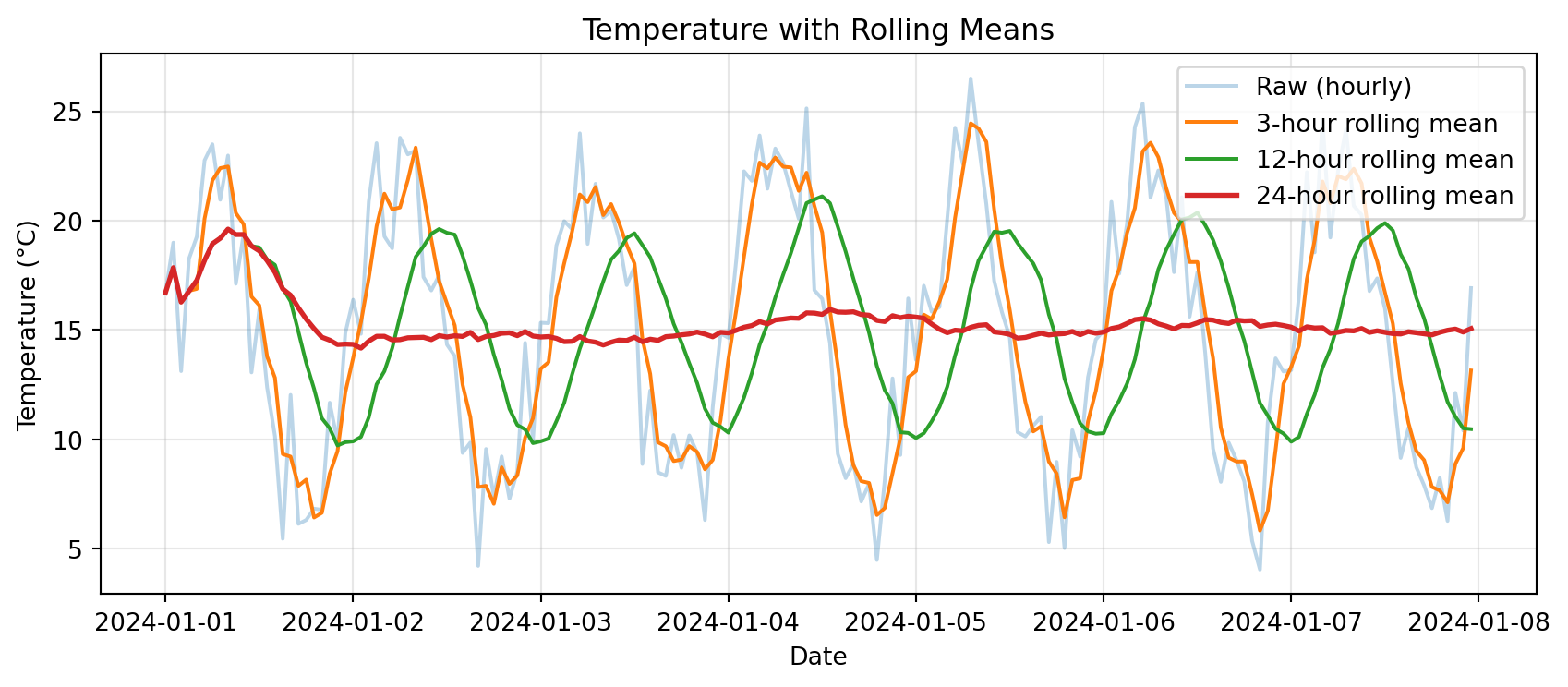
Rolling Windows

Rolling window: Compute statistics over a moving time window

Common uses:

  • Smoothing noisy data
  • Detecting trends
  • Computing local statistics
import matplotlib.pyplot as plt

# Rolling means with different windows
df_temp['rolling_3h'] = df_temp['temp_c'].rolling('3h').mean()
df_temp['rolling_12h'] = df_temp['temp_c'].rolling('12h').mean()
df_temp['rolling_24h'] = df_temp['temp_c'].rolling('24h').mean()

# Plot
plt.figure(figsize=(9, 4))
plt.plot(df_temp.index, df_temp['temp_c'], alpha=0.3, label='Raw (hourly)')
plt.plot(df_temp.index, df_temp['rolling_3h'], label='3-hour rolling mean')
plt.plot(df_temp.index, df_temp['rolling_12h'], label='12-hour rolling mean')
plt.plot(df_temp.index, df_temp['rolling_24h'], label='24-hour rolling mean', linewidth=2)
plt.xlabel('Date')
plt.ylabel('Temperature (°C)')
plt.title('Temperature with Rolling Means')
plt.legend()
plt.grid(True, alpha=0.3)
plt.tight_layout()
plt.show()
Rolling Statistics

Beyond rolling mean:

  • rolling().std() → changing variability
  • rolling().min() / rolling().max() → extreme values
  • rolling().sum() → cumulative over window
# Rolling standard deviation shows variability
df_temp['rolling_std_12h'] = df_temp['temp_c'].rolling('12h').std()

print("Rolling 12-hour statistics:")
print(df_temp[['temp_c', 'rolling_12h', 'rolling_std_12h']].describe())
Rolling 12-hour statistics:
           temp_c  rolling_12h  rolling_std_12h
count  168.000000   168.000000       167.000000
mean    14.959981    15.196249         4.578259
std      5.765931     3.489452         1.146860
min      4.042453     9.719087         1.618360
25%      9.783725    11.686283         3.536457
50%     15.137600    15.428710         4.658228
75%     19.900026    18.474852         5.590957
max     26.502224    21.115570         6.600526

Use cases:

  • High rolling std → variable conditions
  • Low rolling std → stable conditions
  • Combine mean + std for confidence bands

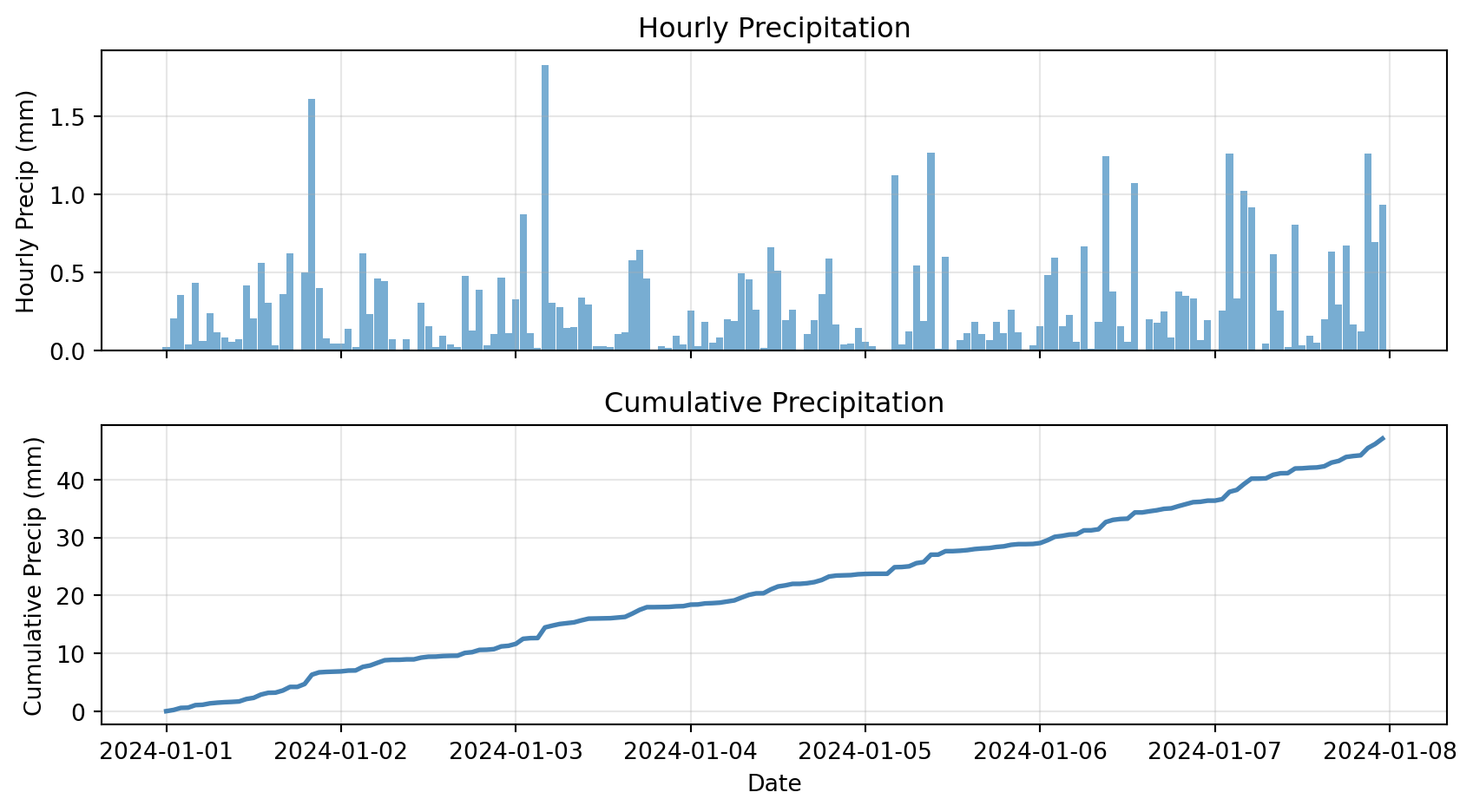
Cumulative Sums

Cumulative sum: Running total over time

Example: Total accumulated precipitation

# Create precipitation data
dates = pd.date_range('2024-01-01', periods=168, freq='h')
precip = pd.DataFrame({
    'precip_mm': np.random.exponential(0.3, 168)
}, index=dates)

precip['cumulative_precip'] = precip['precip_mm'].cumsum()

# Plot
fig, (ax1, ax2) = plt.subplots(2, 1, figsize=(9, 5), sharex=True)

ax1.bar(precip.index, precip['precip_mm'], width=0.04, alpha=0.6)
ax1.set_ylabel('Hourly Precip (mm)')
ax1.set_title('Hourly Precipitation')
ax1.grid(True, alpha=0.3)

ax2.plot(precip.index, precip['cumulative_precip'], linewidth=2, color='steelblue')
ax2.set_xlabel('Date')
ax2.set_ylabel('Cumulative Precip (mm)')
ax2.set_title('Cumulative Precipitation')
ax2.grid(True, alpha=0.3)

plt.tight_layout()
plt.show()
Plotting Time Series

Pandas Native Plotting

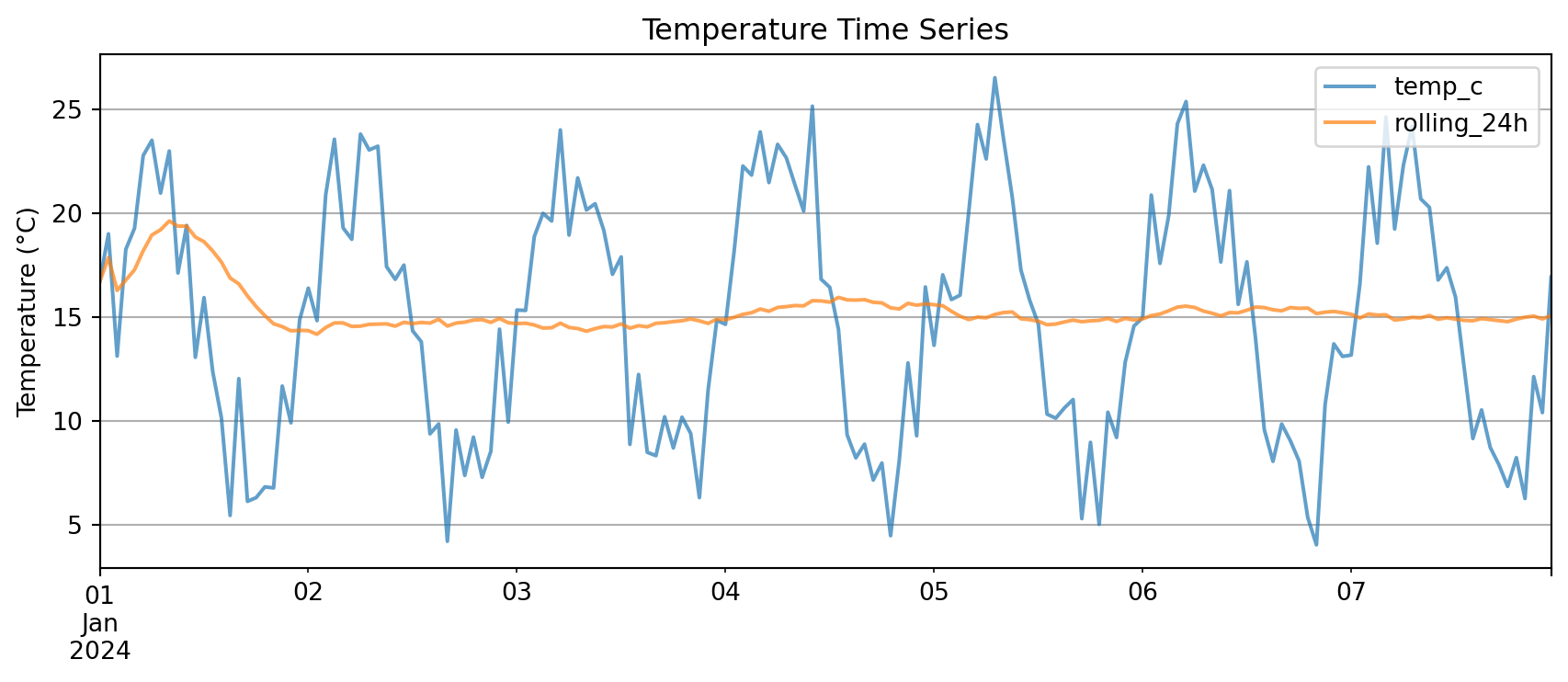
For quick plots, Pandas supports native plotting functionality

DataFrame columns plot directly vs the DF index:
# Simple plot with .plot()
df_temp[['temp_c', 'rolling_24h']].plot(
    figsize=(9, 4),
    title='Temperature Time Series',
    ylabel='Temperature (°C)',
    grid=True,
    alpha=0.7
)
plt.tight_layout()
plt.show()

Key advantage: .plot() knows to use the index on the x-axis

You need very little matplotlib glue!

Multi-Panel Time Series

Complex example: Multiple variables with different scales

# Create comprehensive dataset
dates = pd.date_range('2024-01-01', periods=168, freq='h')
weather = pd.DataFrame({
    'temp_c': 15 + 8 * np.sin(np.arange(168) * 2 * np.pi / 24) + np.random.randn(168) * 2,
    'rh_pct': 60 + 20 * np.sin(np.arange(168) * 2 * np.pi / 24 + np.pi/4) + np.random.randn(168) * 5,
    'precip_mm': np.random.exponential(0.3, 168)
}, index=dates)

# Add derived quantities
weather['temp_rolling_24h'] = weather['temp_c'].rolling('24h').mean()
weather['cumulative_precip'] = weather['precip_mm'].cumsum()

# Create multi-panel plot
fig, (ax1, ax2, ax3) = plt.subplots(3, 1, figsize=(9, 7), sharex=True)

# Panel 1: Temperature
ax1.plot(weather.index, weather['temp_c'], alpha=0.4, label='Hourly Temp')
ax1.plot(weather.index, weather['temp_rolling_24h'], linewidth=2, label='24-h Rolling Mean')
ax1.set_ylabel('Temperature (°C)')
ax1.set_title('Weather Time Series Analysis')
ax1.legend(loc='best')
ax1.grid(True, alpha=0.3)

# Panel 2: Relative Humidity
ax2.plot(weather.index, weather['rh_pct'], color='green', alpha=0.7)
ax2.set_ylabel('Relative Humidity (%)')
ax2.grid(True, alpha=0.3)

# Panel 3: Precipitation
ax3.bar(weather.index, weather['precip_mm'], width=0.04, alpha=0.6, label='Hourly Precip')
ax3_cum = ax3.twinx()
ax3_cum.plot(weather.index, weather['cumulative_precip'], color='steelblue',
             linewidth=2, label='Cumulative')
ax3.set_xlabel('Date')
ax3.set_ylabel('Hourly Precip (mm)')
ax3_cum.set_ylabel('Cumulative (mm)')
ax3.legend(loc='upper left')
ax3_cum.legend(loc='upper right')
ax3.grid(True, alpha=0.3)

plt.tight_layout()
plt.show()
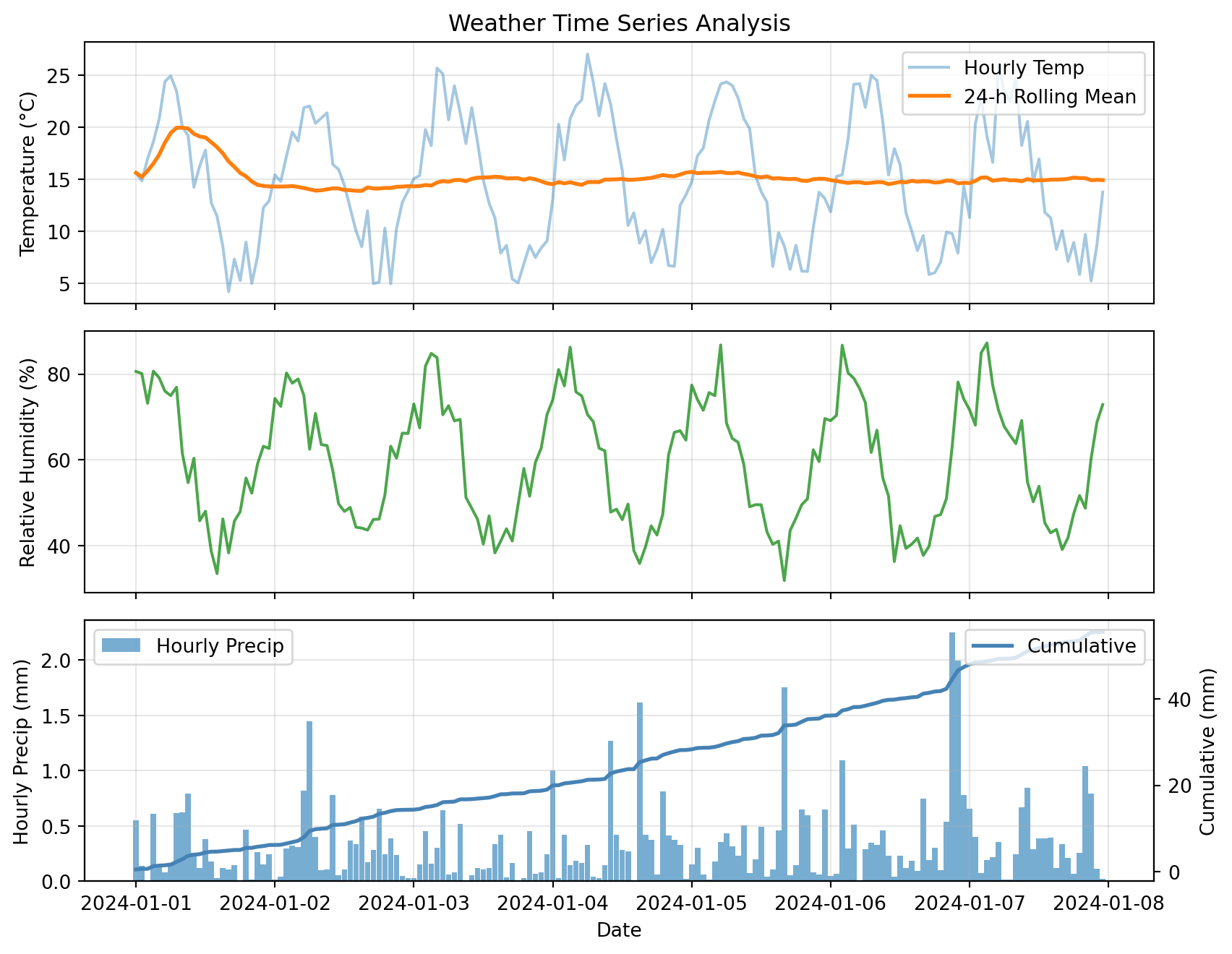
This plot combines:

  • Raw and smoothed time series (top)
  • Secondary variables (middle)
  • Hourly bars + cumulative line with twin y-axes (bottom)

Advanced Topics

Rolling Metrics Summary

Raw time series are noisy and hard to interpret

Rolling metrics show local behavior over a window:

  • Rolling mean → smoothed trend
  • Rolling std → changing variability
  • Rolling min/max → local extremes

Cumulative sums show how a quantity builds up over time:

  • Total precipitation
  • Energy use
  • Accumulated degree-days

Key insight:

Rolling stats tell you what is happening locally, cumulative sums tell you what has built up so far. Together they explain the story better than raw values alone.

We will get into the issues with some of these metrics later in the course.

Threshold-Based Filtering

With a time index, masks work the same as NumPy but now have dates on the side

Example: Find “rainy hours” where hourly precip exceeds 0.5 mm

# Create sample precipitation data
dates = pd.date_range('2024-01-01', periods=168, freq='h')
precip_df = pd.DataFrame({
    'precip_mm': np.random.exponential(0.3, 168)
}, index=dates)

# Boolean mask
rainy_hours = precip_df['precip_mm'] > 0.5

# Count and extract
print(f"Number of rainy hours: {rainy_hours.sum()}")
print(f"\nRainiest hours:")
print(precip_df[rainy_hours].nlargest(5, 'precip_mm'))
Number of rainy hours: 30

Rainiest hours:
                     precip_mm
2024-01-01 12:00:00   1.708789
2024-01-03 08:00:00   1.634904
2024-01-06 15:00:00   1.356739
2024-01-01 06:00:00   1.321537
2024-01-04 16:00:00   1.209265

Boolean masks let you:

  • Count how many times a condition occurs
  • Extract those rows for inspection or plotting
  • Combine multiple conditions: (temp > 30) & (rh < 20) for hot and dry

Helper Functions

We keep writing the same pattern:

  • Resample a time series
  • Compute mean temp and total precip
  • Maybe plot or compare different windows

Instead of copy-pasting, wrap it in a helper function:

def summarize_period(df, freq='1D', temp_col='temp_c', precip_col='precip_mm'):
    """
    Resample time series to specified frequency.

    Parameters
    ----------
    df : pd.DataFrame
        Input dataframe with time index
    freq : str
        Resample frequency ('1h', '1D', '1W', etc.)
    temp_col : str
        Name of temperature column
    precip_col : str
        Name of precipitation column

    Returns
    -------
    pd.DataFrame
        Resampled data with mean temp and total precip
    """
    summary = df.resample(freq).agg({
        temp_col: ['mean', 'min', 'max'],
        precip_col: 'sum'
    })
    return summary

# Test the function
daily_summary = summarize_period(weather, freq='1D', temp_col='temp_c', precip_col='precip_mm')
print(daily_summary)
               temp_c                       precip_mm
                 mean       min        max        sum
2024-01-01  14.298228  4.196823  24.909452   6.204678
2024-01-02  14.324422  4.962563  22.017241   8.153072
2024-01-03  14.595658  5.048532  25.665051   4.659718
2024-01-04  15.628809  6.637131  27.006960   9.168673
2024-01-05  15.025250  6.140893  24.336369   7.921276
2024-01-06  14.649105  5.847480  24.958588  11.273186
2024-01-07  14.909084  5.217617  25.976589   8.128068

Benefits:

  • One place to define “how to summarize a period”
  • Call it with different frequencies: '6h', '1D', '3h'
  • Reusable across projects
  • Easy to test and debug

Bonus Challenge 💻

Design a ‘heatwave detector’ that flags multi-day warm spells

Task: Create a function find_heatwaves(df, threshold=55, min_duration=48) that returns a list of (start_timestamp, end_timestamp, peak_temp) for every period where the hourly air temperature stays above threshold for at least min_duration consecutive hours.

Hints:

  1. Create a boolean Series: df['temp_c'] > threshold
  2. Use .diff() or .ne() with cumsum() to label contiguous blocks
  3. Aggregate each block to compute duration and peak temperature
  4. Plot each detected heatwave on top of the main time-series figure

Example approach:

def find_heatwaves(df, threshold=55, min_duration=48):
    """Detect heatwaves in temperature time series."""
    # Create boolean mask
    is_hot = df['temp_c'] > threshold

    # Label contiguous blocks
    blocks = (is_hot != is_hot.shift()).cumsum()

    # Filter for hot blocks only
    hot_blocks = blocks[is_hot]

    # Compute duration and peak for each block
    heatwaves = []
    for block_id in hot_blocks.unique():
        block_data = df[blocks == block_id]
        duration = len(block_data)
        if duration >= min_duration:
            start = block_data.index[0]
            end = block_data.index[-1]
            peak = block_data['temp_c'].max()
            heatwaves.append((start, end, peak))

    return heatwaves

Looking Ahead

Assignment Checklist

Due Friday at 9pm:

  • Lab 4
  • HW4

HW4 Summary:

  • Load CSV data with parse_dates
  • Set time index for easy slicing
  • Resample to different frequencies
  • Compute anomalies from climatology
  • Create rolling window statistics
  • Plot multi-panel time series
  • Write helper functions for reusable analysis

Resources and Support

Available to you:

  • Lab notebooks with step-by-step examples
  • Office hours (bring your data questions!)
  • Discussion channels
  • Pandas docs: pandas.pydata.org

Remember: Pandas takes practice. Start with simple operations, build up complexity. The time index is your friend!

Questions?

Contact

Prof. Will Chapman

📧 wchapman@colorado.edu

🌐 willychap.github.io

🏢 ATOC Building, CU Boulder

See you next week!